

NNexaSupply 1.0 · NexaIT's procurement system
Cartons, stretch film and spare parts, from request to consumption on a cost centre.
NexaSupply runs indirect and production support materials in one system: request, approval with a budget check, purchase order, receiving by scanner, location, issue to a cost centre, stock count and invoice. On your server, in Polish and English.
PZ, MM, RW
and other stock documents in an append-only movement ledger
2/3-way
matching the invoice to the order and receipt, with tolerances
4 vCPU, 8 GB
recommended server according to the installation guide, with Docker
PL and EN
office and terminal interface, user guides
Product status
Version 1.0, now accepting the first pilot implementations
NexaSupply is ready to install, but it does not yet have customer implementations we could refer to, and we check compatibility with terminals on the customer's devices during the pilot. We start with one stockroom and one materials flow, with agreed acceptance criteria.
Without tape, shipping stops, and the tape lives in a notebook by the rack.
Cartons, stretch film, pallets, personal protective equipment, chemicals and spare parts are not goods for sale, so they rarely make it into a warehouse system. Stock levels are in a spreadsheet, orders go by e-mail to a sales rep someone knows, and the line or the shipping team is the first to learn about a shortage.
NexaSupply closes this loop in one system. An employee raises a request from the catalogue, the approval matrix checks the amount, category, cost centre and budget, and the buyer combines requests into purchase orders to suppliers. The stockroom receives the delivery by scanner, puts it away to a location and issues it to a cost centre, department, employee or machine.
Finance sees budget commitment at the moment of approval, not after the fact, and matches invoices to orders and receipts. It is an indirect materials stockroom, not a full warehouse management system for trade goods, and not an ERP. Configuration, fields and dictionaries are changed in the interface, without code changes.
See the screens before you book a demo.
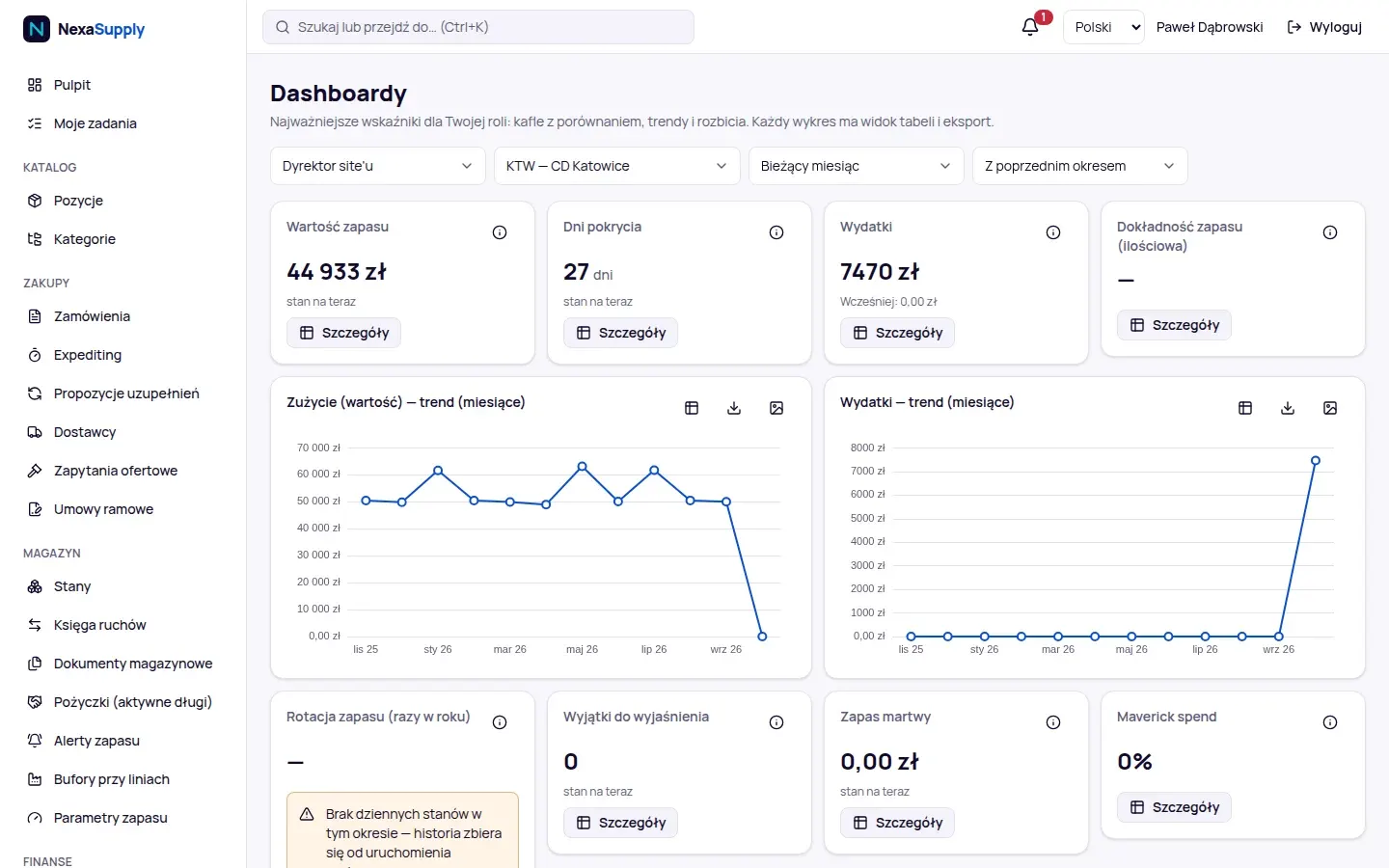
Role-based dashboards
Stock value, turnover, spend and stock accuracy, monthly consumption trends. Every chart has a table view and an export.
From request to supplier
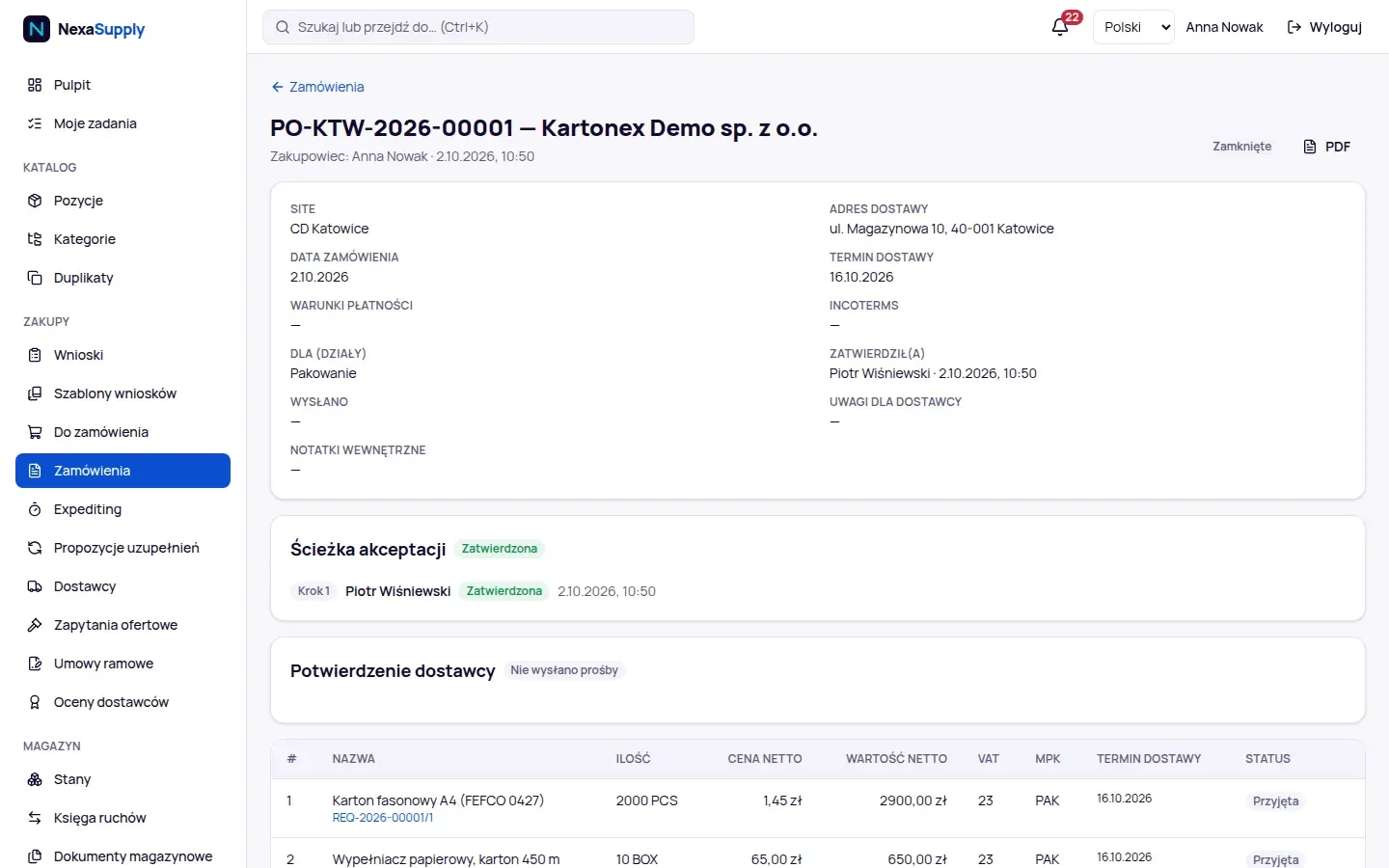
A purchase order with an approval path, PDF and e-mail to the supplier, confirmation by link without signing in, and lines assigned to cost centres.
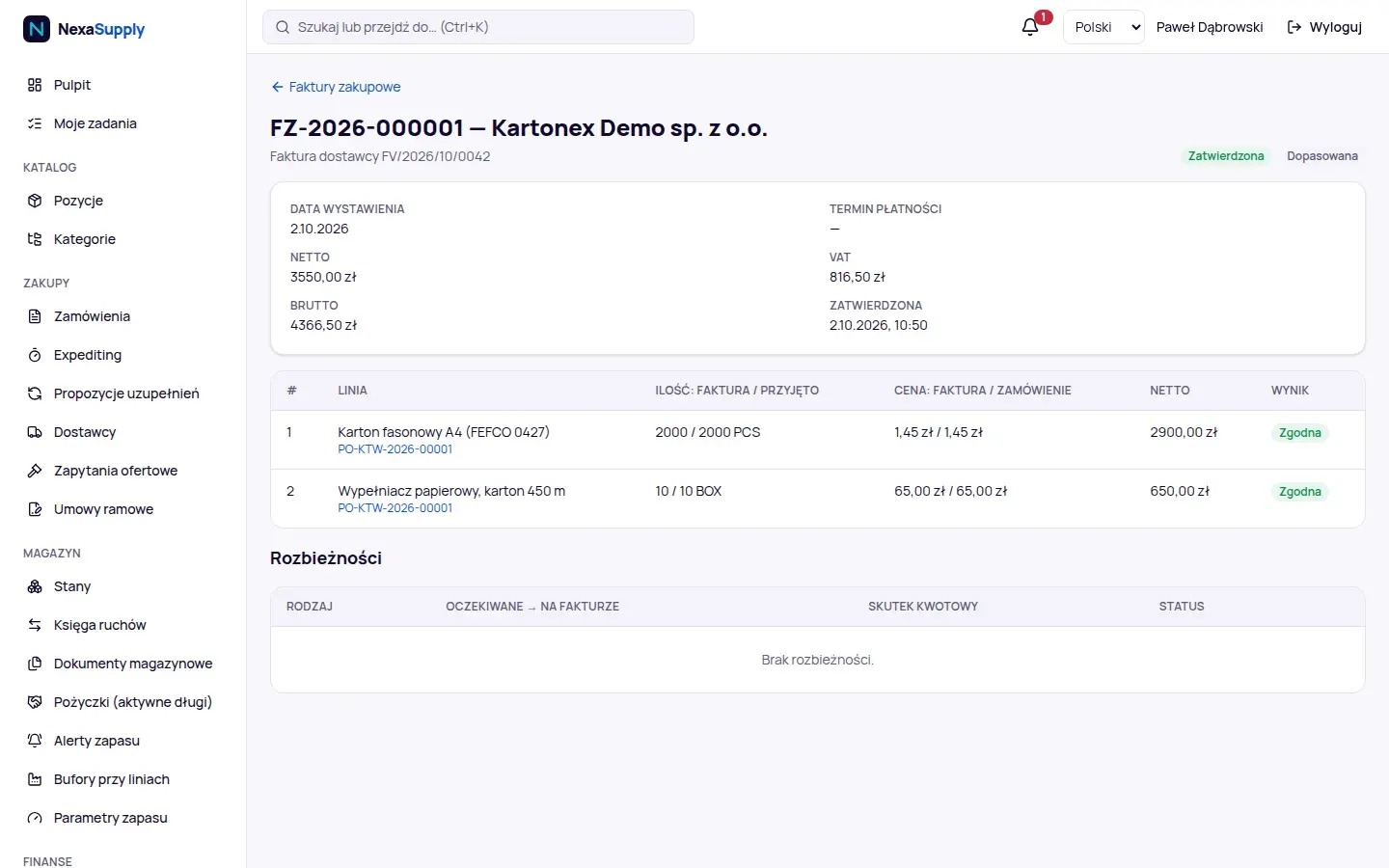
2/3-way matching
Invoice quantity and price against the order and receipt, with tolerances. Discrepancies go to a queue, matching lines go for approval.
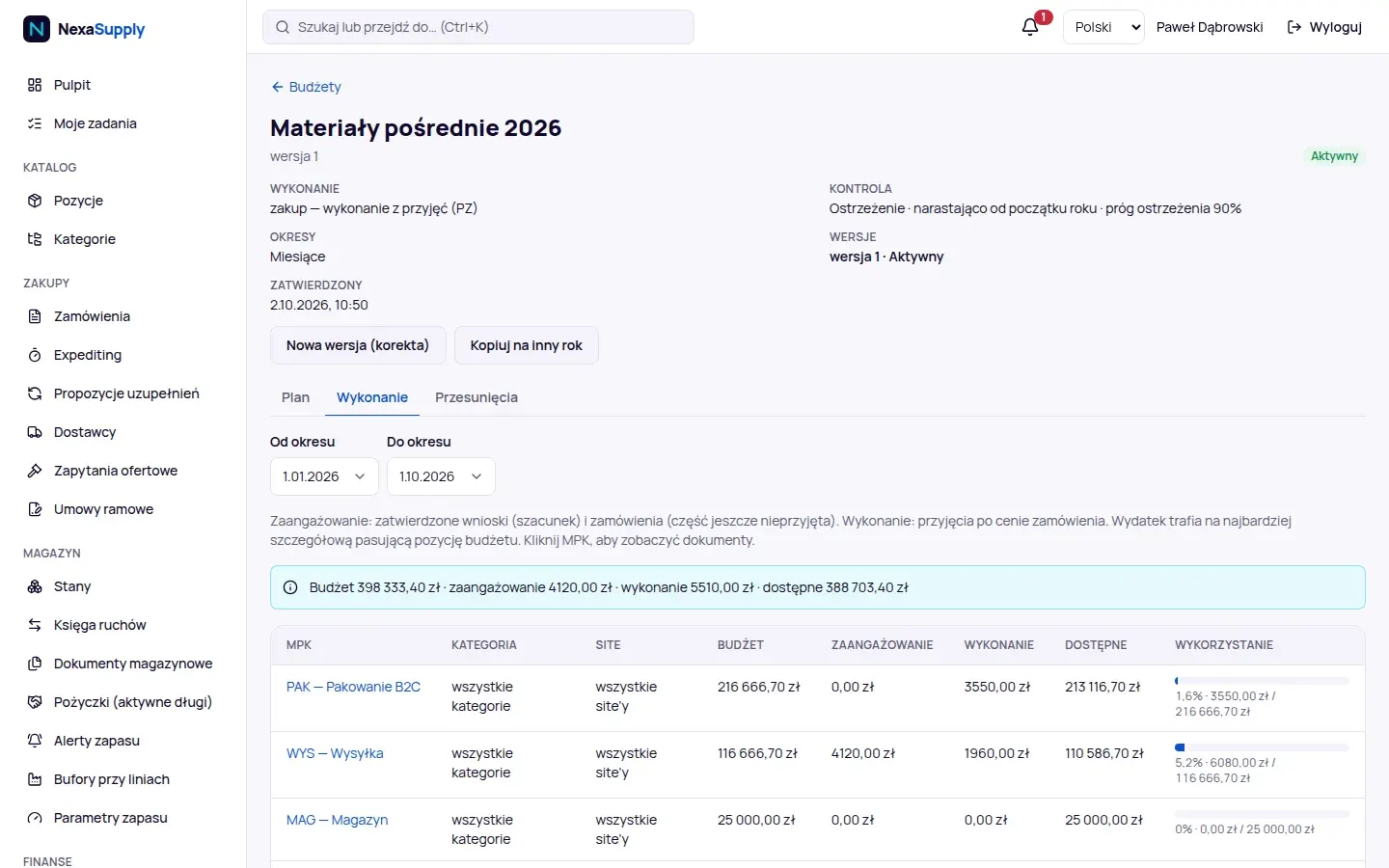
Budget at the moment of approval
Plan, commitment and actuals by cost centre, category and site. Approval can warn, ask for confirmation or block the spend.
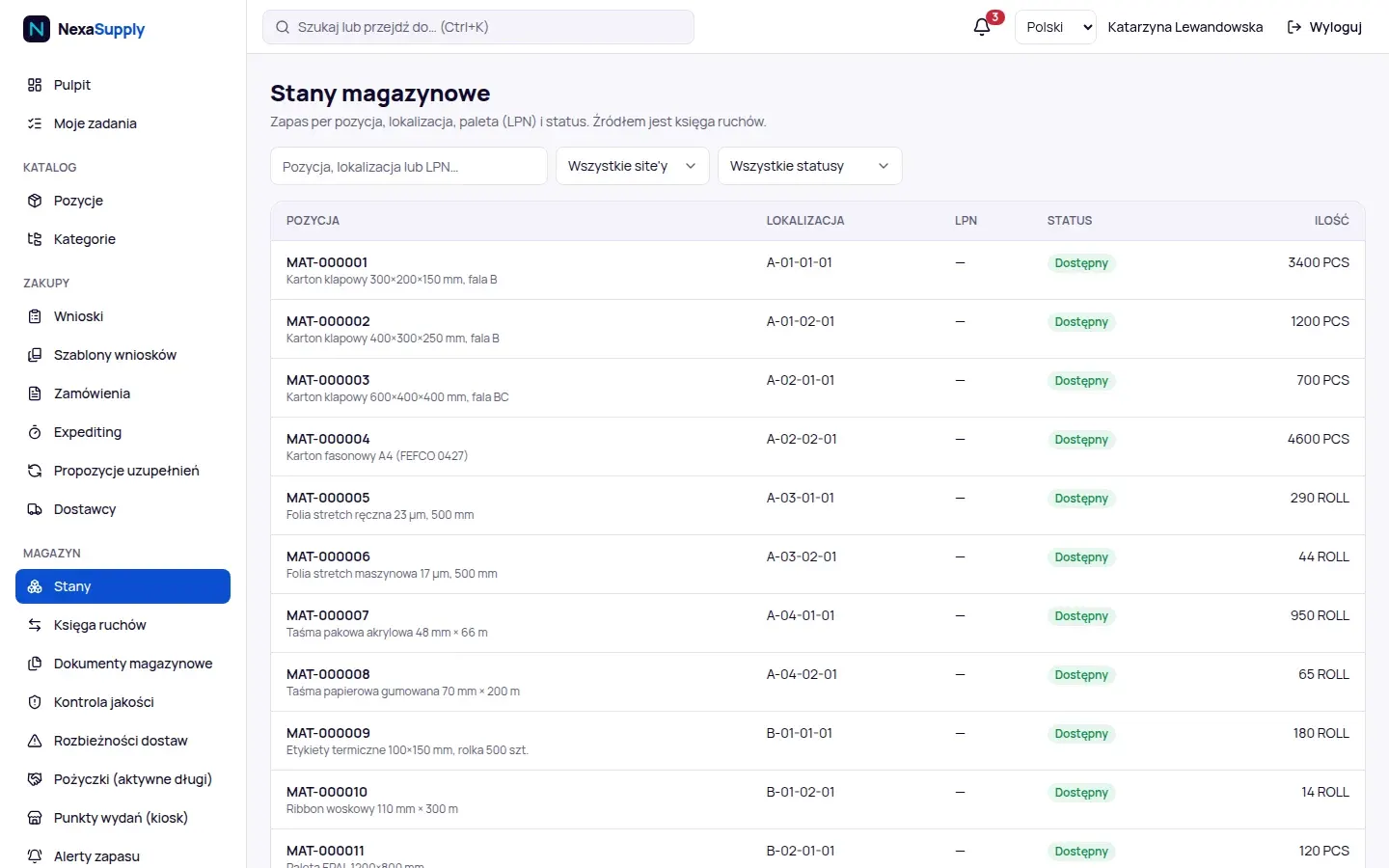
Stock by location
Items, locations, pallets and statuses from a movement ledger that cannot be overwritten. A correction is a reversal, not an edit.
Shortages before shipping stops
Items below minimum with available quantity, min/max parameters and reorder point, replenishment proposals with an explanation.
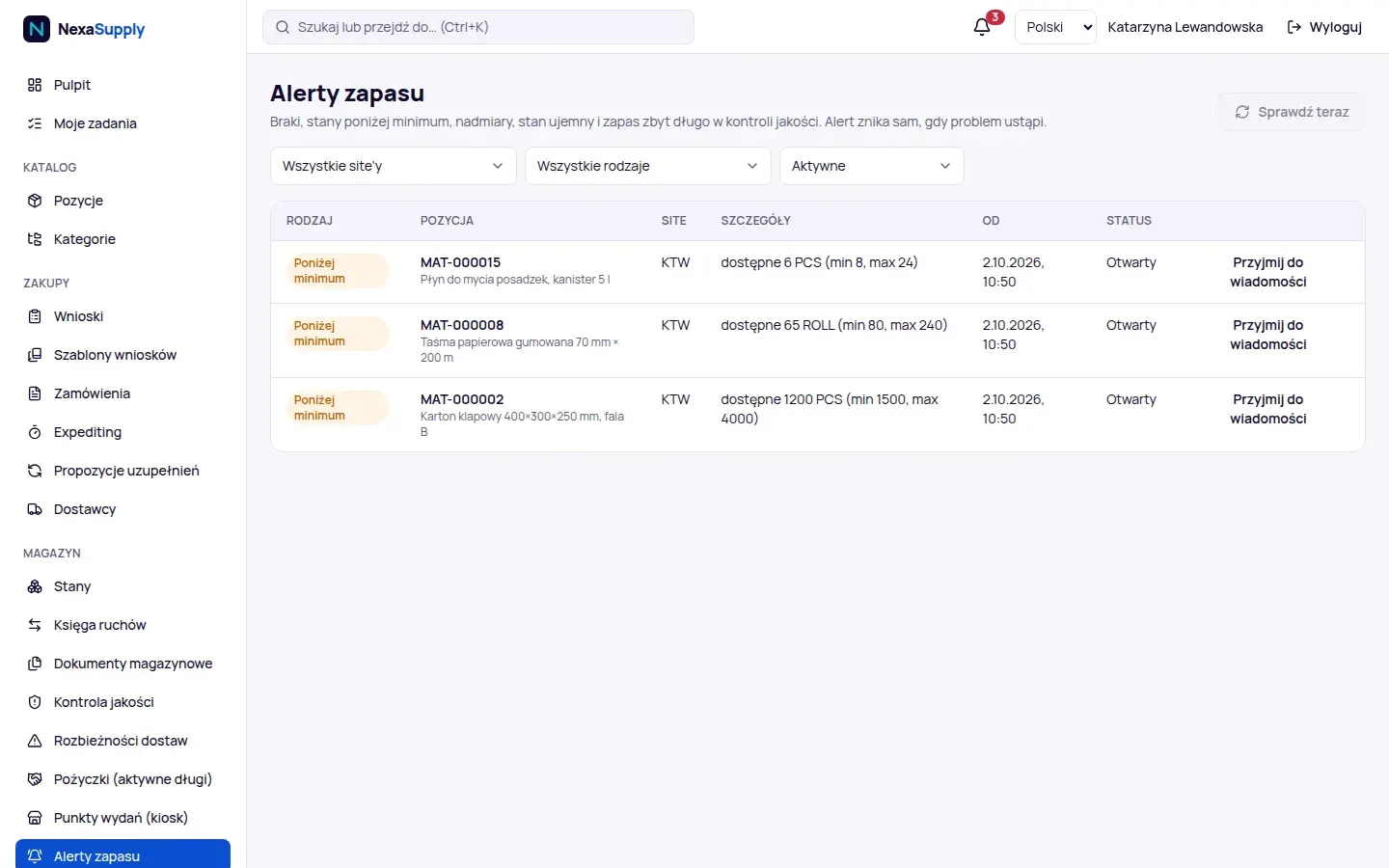
Screenshots from a NexaSupply 1.0 demo installation. The company, people and data are fictitious.
What is in version 1.0, with no promises for later.
Procurement
- requests from the catalogue and free text, templates, timeline
- approval matrix: amount, category, cost centre, site, delegates, segregation of duties
- purchase orders: consolidation of requests per supplier, delivery tranches, revisions, PDF and e-mail
- order confirmation by the supplier via a link, without signing in
- tracking of late and at-risk deliveries
Suppliers and tenders
- offers with price breaks and price history
- framework agreements with value and quantity limits
- supplier documents with expiry dates
- supplier ratings: on-time in full, quality, lead time
- requests for quotation with TCO, ranking and a bidder portal without signing in
Materials stockroom
- receiving against purchase orders with tolerances, quality control and discrepancies
- GS1 barcode scanning, pallets with ZPL labels, put-away with a suggested location
- moves, issues of whole pallets and pieces, returns, scrapping, reversals
- line-side buffers with kanban and loans between departments
- blind stock counts with a recount by another person
Terminal on the shop floor
- an app in Chrome on Android, installed like an application
- designed for scanners working in keyboard mode, as well as USB and Bluetooth scanners
- moves, issues, returns and scrapping recorded offline and sent when the network is back
- self-service issue kiosk with an employee badge, while the network is up
- lookup: scan a pallet, location, item or order
Finance
- budgets by cost centre, category, site and period, with versions and transfers
- alerts at 80% and 100% of the budget
- purchase invoices entered manually and 2/3-way matching
- "received, not invoiced" report and stock valuation at the invoice price
- export to the finance and accounting system in CSV and XLSX
Administration and analytics
- custom fields, dictionaries and terminology per installation
- Excel import with a dry run
- audit and security log, effective permissions
- role dashboards, a KPI library with targets, ABC/XYZ classification
- reports with export and scheduled e-mail delivery
Who NexaSupply is for, and who it is not for.
A good fit if
- Distribution centres, e-commerce fulfilment, manufacturing plants and logistics operators with their own materials stockroom.
- Indirect materials live in a spreadsheet today, and orders in e-mails.
- You want to know how much a department, shift or cost centre consumes, also relative to work volume.
- The materials budget should be checked when spend is approved, not after the month is closed.
We don't recommend it if
- You are looking for a full warehouse management system for trade goods, an ERP, MRP or maintenance management system.
- You need a ready-made integration with a specific ERP. Version 1.0 does not have one; we price integration as a separate project.
- Invoices should arrive automatically from KSeF. Version 1.0 does not support this.
- The system has to be reachable from the internet for many people, and sign-in must have a second factor today.
Specification, no small print.
Installation
- Linux x86_64, Docker 27 or later and Docker Compose
- recommended server: 4 vCPU, 8 GB RAM, 40 GB disk
- HTTPS through Caddy: an internal certificate on the company network or Let’s Encrypt
- installer, backups, restore and backup test, each with one command
- one company per installation, many sites inside it
Security
- Argon2id passwords, at least 12 characters, a list of common passwords
- login rate limit and account lockout after failed attempts
- roles with data scope per site and segregation of duties in approvals
- an audit log from which the application cannot delete entries
- self-review against OWASP ASVS 4.0.3 Level 2
Hardware and integrations
- ZPL II label printers, including ZPL emulation; PDF as a fallback
- location labels as PDF with Code 128 barcodes
- REST API described in OpenAPI, with session sign-in
- read-only access for BI tools through a reporting schema
- XLSX and CSV import and export, e-mail through your SMTP server
What is not there yet.
We say this before implementation so there are no disappointments. Version 1.0 does not have these features:
- two-factor authentication and SSO or LDAP sign-in
- ready-made connectors to ERP systems and KSeF support
- API keys, service accounts and webhooks
- consumption forecasting and per-person issue limits in the kiosk
- scanning with the phone camera
Questions about NexaSupply.
Is NexaSupply a warehouse management system?
For indirect and production support materials, yes: receiving, locations, pallets, issues and stock counts. It is not a full warehouse management system for trade goods, nor an ERP.
Which scanners does the terminal support?
The terminal runs in Chrome on Android and is designed for scanners in keyboard mode, for example with a DataWedge profile, as well as USB and Bluetooth scanners. We check compatibility with your devices during the pilot.
What if the Wi-Fi drops on the shop floor?
The terminal stores moves, issues, returns and scrapping in a queue on the device and sends them once when the network is back. Receiving and the kiosk need a connection.
Will you connect NexaSupply to our ERP?
Version 1.0 has an export to the finance and accounting system in CSV and XLSX, and an API. There are no ready-made ERP connectors, so we price the integration as a separate project after checking your system.
Where does NexaSupply run?
On your company's server or on a cloud server bought in your company's name, in Docker containers. One installation serves one company with multiple sites.
How much does NexaSupply cost?
We price the licence, implementation and ongoing care individually, after a conversation about the number of sites, users and the scope of the pilot.
Online demo · no obligation
See NexaSupply live, on demo data.
- Online demoWe show NexaSupply on demo data, from request to invoice.
- Choosing a materials flow for the pilotOne stockroom, a group of materials and a measure by which you will judge the result.
- Installation and terminal testOn your server, with a backup and a restore test. We check scanners and printers on site.
- Acceptance and decisionAfter the pilot we check the measure, and you decide whether to extend the system to further stockrooms.