Skip to content

535 040 361511 275 531

Book an IT review

Nexa Hub 1.2 · a ticketing system by NexaIT

A ticketing system for businesses, running on your own server.

A fault reported on the spot, fixed within a deadline everyone can see. One portal for Facility, IT, security, WMS support and every department you add. A QR code on the door or a PIN kiosk on the shop floor, a queue with an SLA clock for the team, numbers for management.

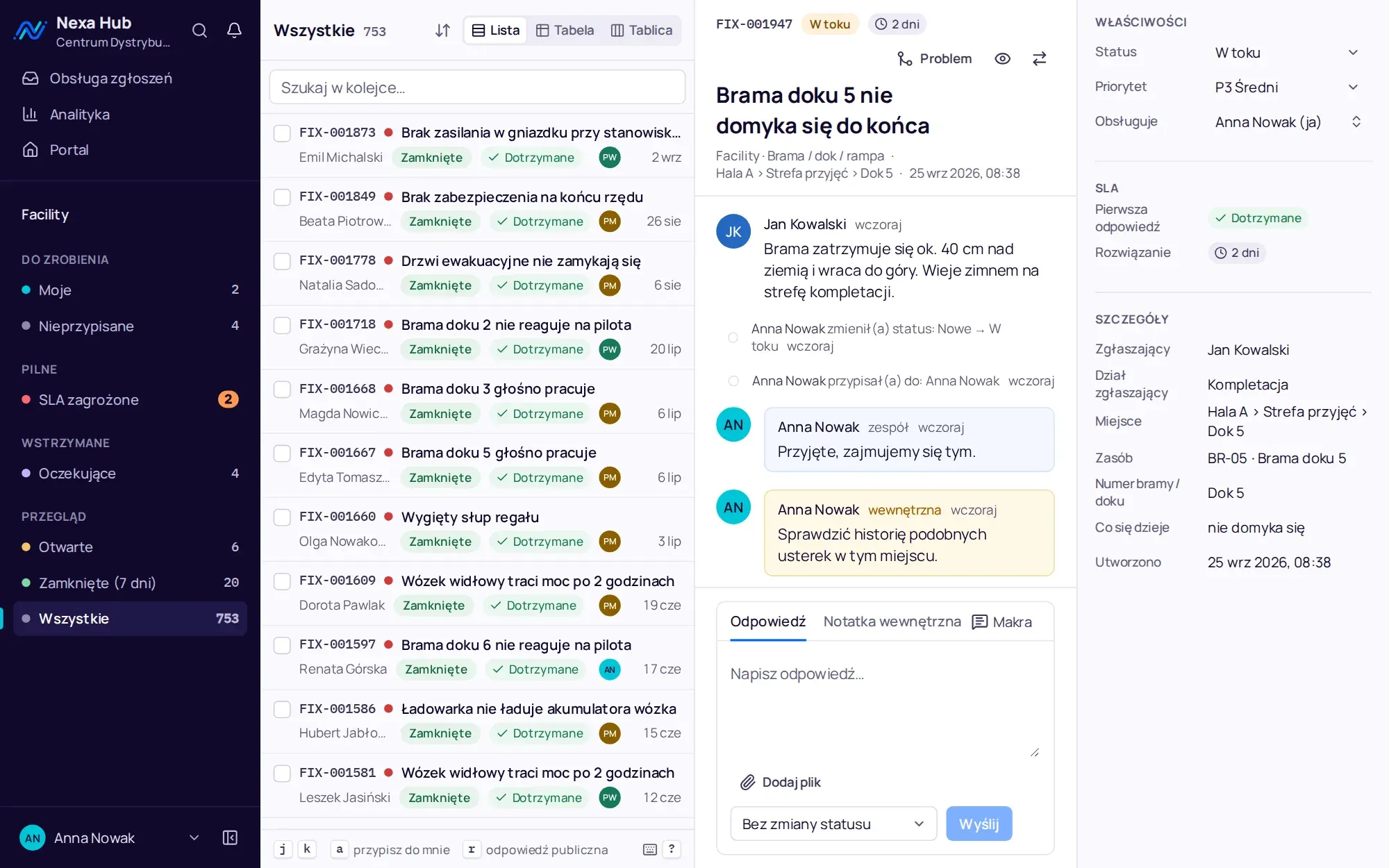
A dock 5 door fault in the Facility department desk: conversation, internal note, SLA and location details

200k

tickets in the pre-release performance test

c. 300 MB

of memory at idle, on a server from 2 vCPUs and 2 GB RAM

ASVS L2

OWASP security review before release

PL and EN

interface, e-mails and Polish public holidays in the SLA calendar

One ticketing system, as many queues as departments.

Nexa Hub is a multi-department ticketing system (service desk) that you install on your own server. We built it at NexaIT for companies where tickets are not only about computers: warehouses, distribution centres, manufacturing plants and offices with several support departments.

Employees have one address and one portal. They choose a department and a request type and fill in a short form, and the ticket lands in the right team's queue with the location, equipment, photo and SLA deadline. Each department has its own forms, statuses, response times, team and analytics, and management sees all departments in one table.

The system works in Polish and English, counts deadlines in shift hours with Polish public holidays and runs on a single server with Docker. Ticket data, photos and accounts stay in your infrastructure.

See the screens before you book a demo.

Three steps to a ticket

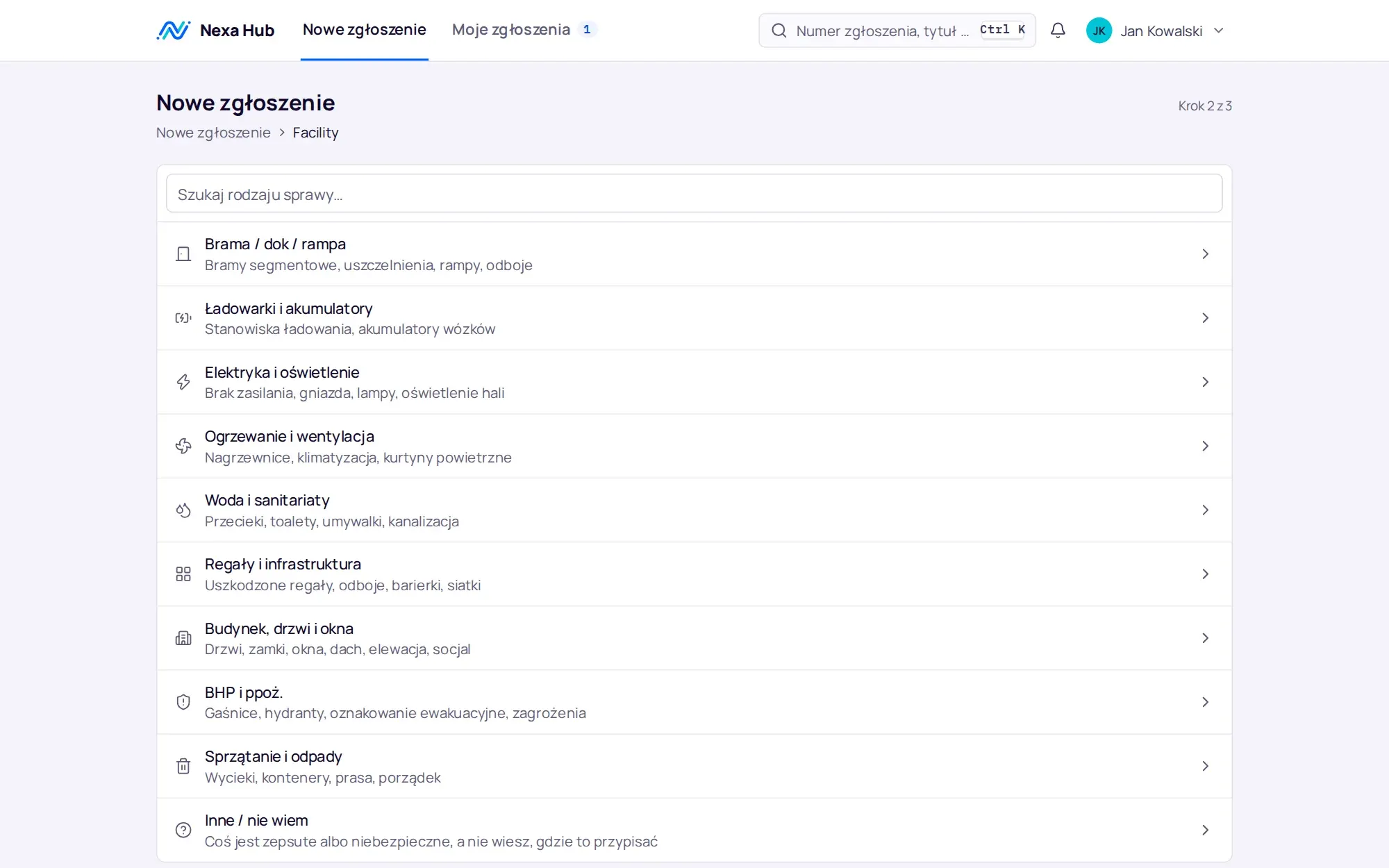
Department, request type, form. Fields that fit the request, a location from the site tree, a photo pasted from the clipboard.

Employee portal: Facility department request types with descriptions

A queue with an SLA clock

Mine, unassigned, at risk of breaching the deadline. Reply, internal note, status and assignment without taking your hands off the keyboard.

A dock 5 door fault in the Facility department desk: conversation, internal note, SLA and location details

Kanban for the team

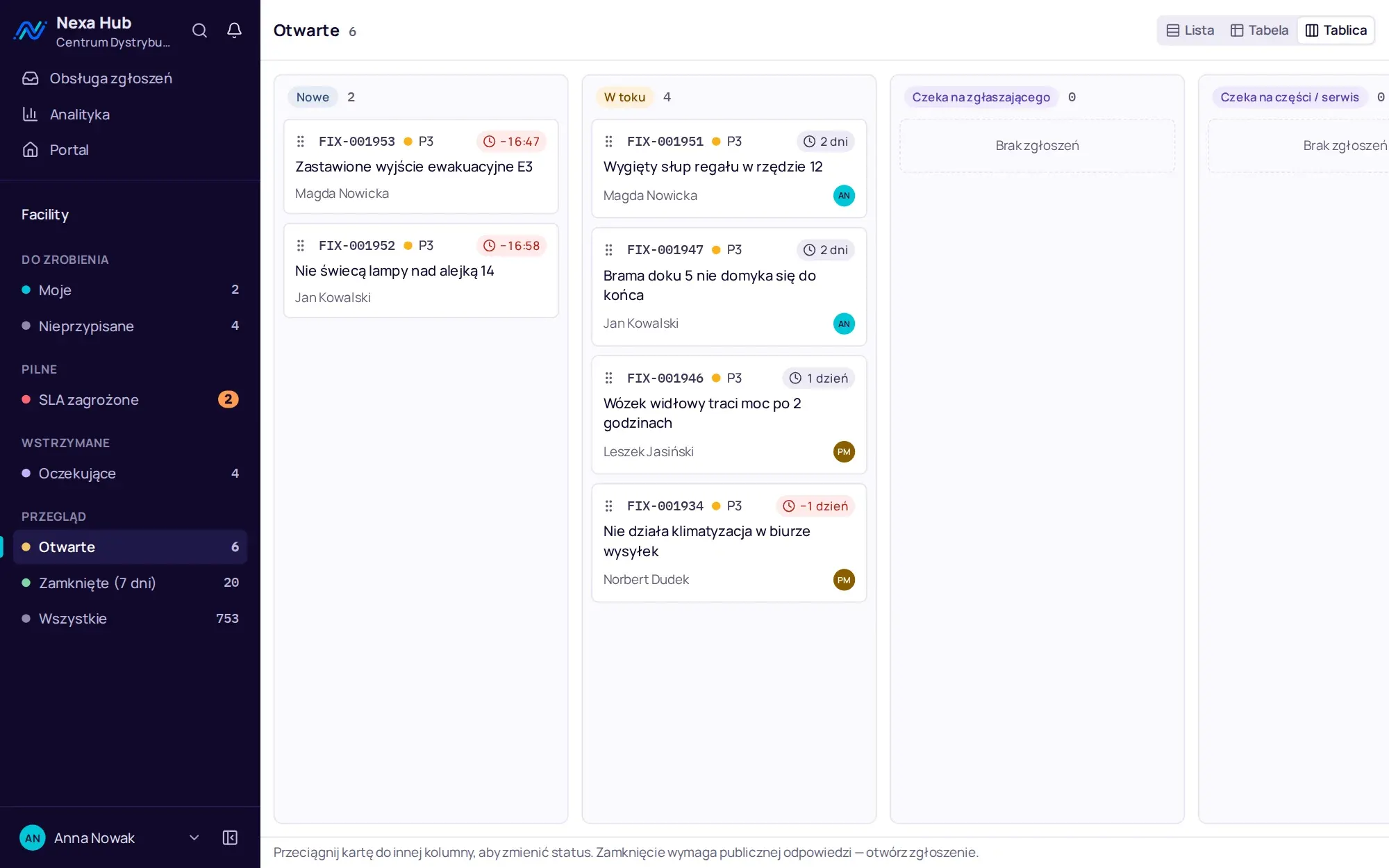
Columns are the department's statuses. Cards are dragged with a mouse, touch or keyboard, and the change can be undone.

Facility department kanban board with status columns

Department dashboard

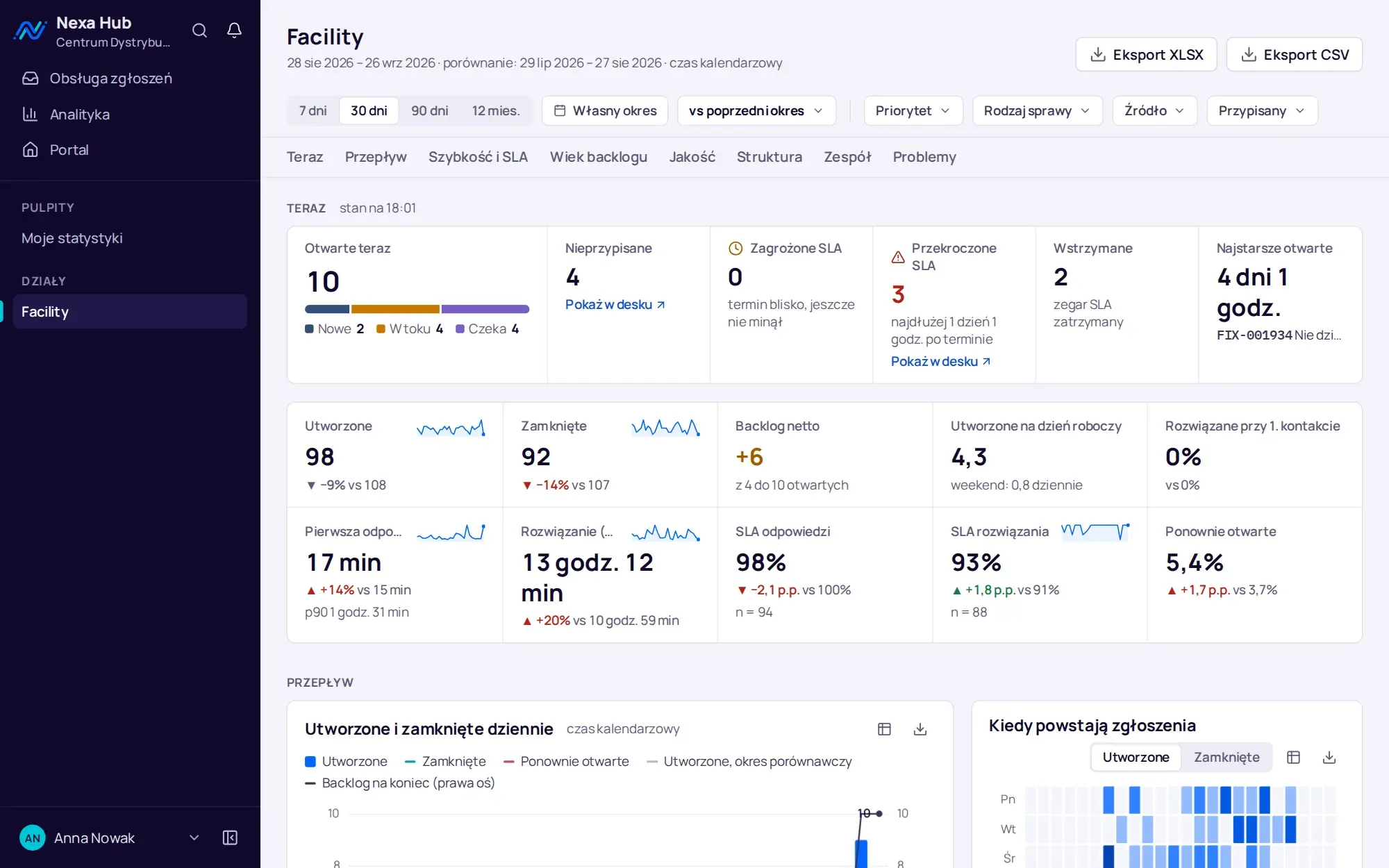
The current state, 10 period indicators with comparison, flow, speed and SLA, backlog age. Clicking a number opens exactly those tickets in the desk.

Facility department analytics dashboard for 30 days: current state, period indicators with comparison and ticket flow

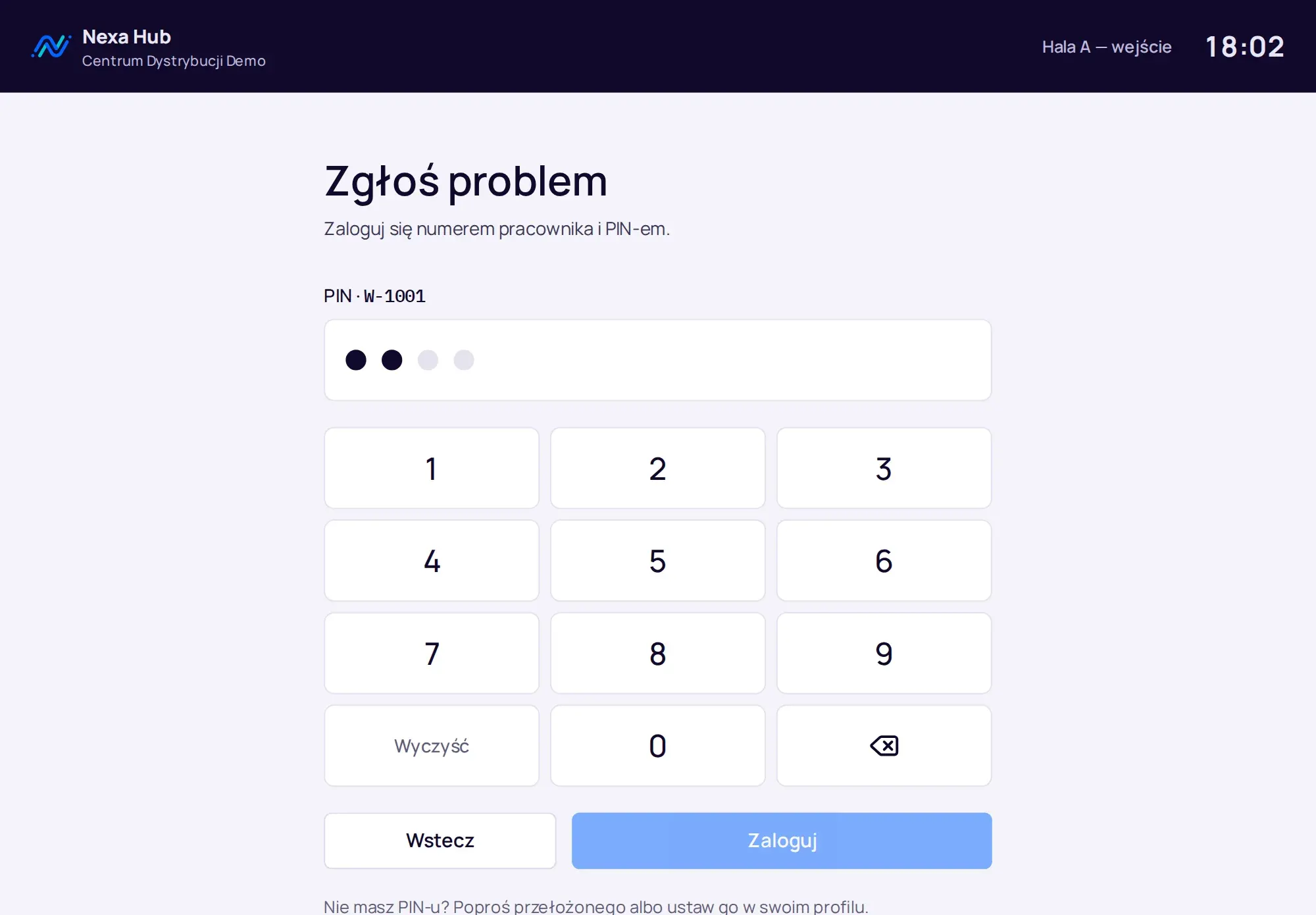
Employee number and PIN

A shared screen on the shop floor for people without a company mailbox. After a minute of inactivity the kiosk signs out by itself.

Shop floor kiosk: sign-in with employee number and PIN on a touch keypad

Departments without a developer

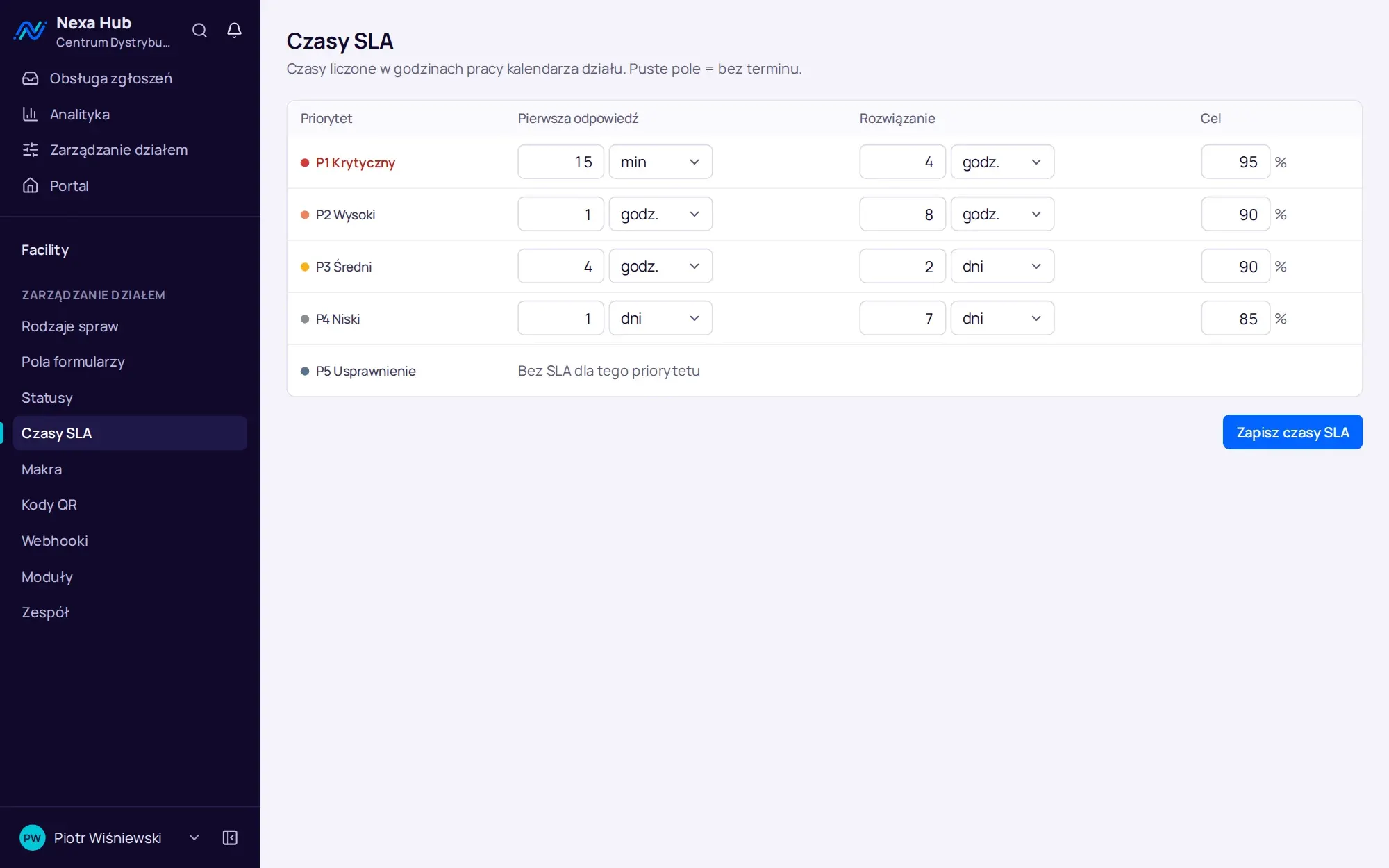
The department administrator sets request types, fields, statuses and SLA times. A department template carries its configuration over to another site.

Department SLA times: first response and resolution for priorities P1 to P4 with a target percentage

Screenshots from a Nexa Hub 1.2 demo installation. The company, people and tickets are fictitious.

One ticket, from the shop floor to the boardroom.

This is the path of a dock 5 door fault in a distribution centre. The screens come from a Nexa Hub 1.2 demo installation, and the company, people and tickets are fictitious.

1. Reporting

A QR code on the door. The form already knows where it is.

The sticker opens a form with the location and request type filled in. Before submitting, the employee sees that someone has already reported the same problem, so the department does not get five copies of one fault.

  • QR codes printed from the browser, 12 stickers per A4 sheet
  • shop floor kiosk: employee number and PIN instead of an e-mail address
  • a photo from a phone or pasted from the clipboard (Ctrl+V)
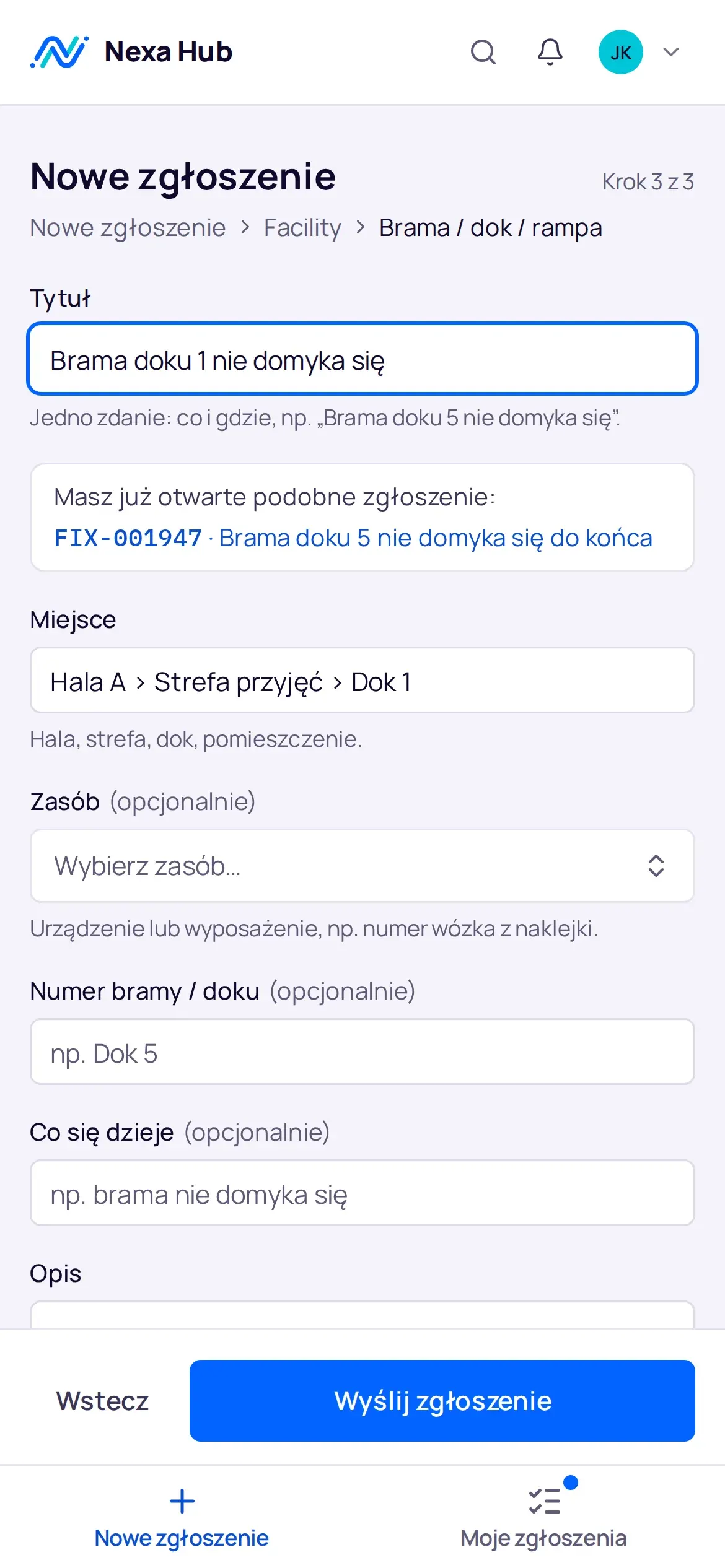
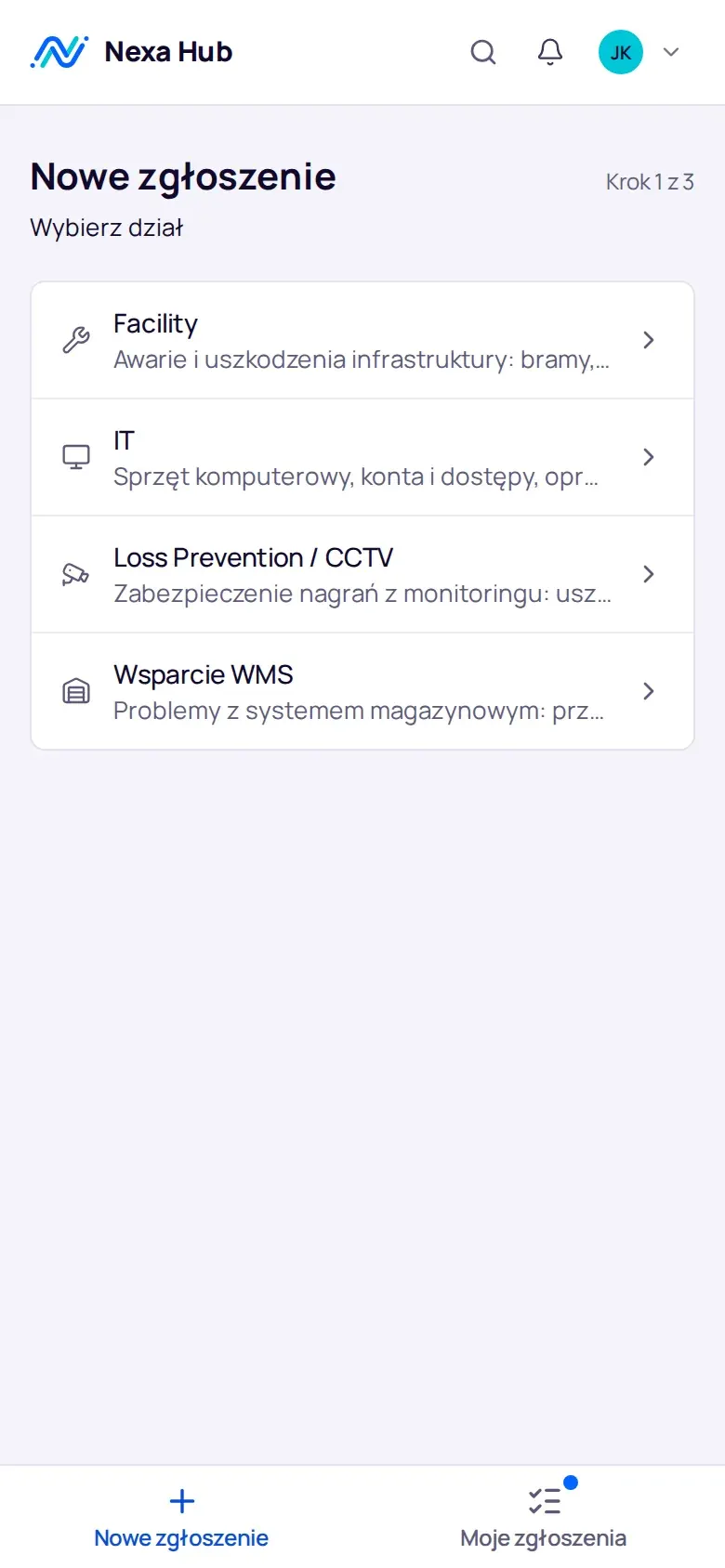
Form opened from a QR code on a phone: location filled in, hint about a similar open ticket
Ticketing portal on a phone: choosing a department

2. Handling

The department queue with an SLA clock.

Agents see their own tickets, unassigned ones and those close to their deadline. They reply to the requester, add a note for the team, change status and assignment. Frequent actions have keyboard shortcuts.

  • list, table and kanban board, Ctrl+K command palette
  • bulk actions with an Undo button, reply macros
  • transfer to another department without changing the ticket number
Facility department kanban board with status columns
Facility department kanban board. Demo installation, fictitious data.

3. Deadline

SLA counted in shift hours.

Three shifts, Saturdays until 2 pm, Polish public holidays added automatically. The deadline does not run at night when the shop floor is idle, and it pauses while a ticket waits for parts or for the requester's reply.

  • first response and resolution set separately for each priority
  • a warning before the deadline and a notification once it is breached
  • an “SLA at risk” queue with a live counter
Department SLA times: first response and resolution for priorities P1 to P4 with a target percentage
Facility department SLA times. Demo installation, fictitious data.

4. Numbers

Analytics you can show to management.

Created and closed, median first response, share of deadlines met, the locations and equipment that fail most often. Every indicator compared with the previous period of the same length.

  • department dashboard and a management dashboard across all departments
  • clicking a number opens exactly those tickets in the desk
  • weekly report by e-mail, export to CSV and XLSX
Facility department analytics dashboard for 30 days: current state, period indicators with comparison and ticket flow
Facility department analytics, last 30 days. Demo installation, fictitious data.

You configure departments yourselves, without a developer.

Request types, form fields, statuses with names for the team and for the requester, SLA times, team, macros, QR codes and webhooks are set by the department administrator. Nothing that concerns a single department requires code changes.

You download a department's configuration as a template and create a department from it at another site or in another installation. The demo installation has four departments set up for a distribution centre.

  • Facilitydoors, docks, chargers, electrics, heating, health and safetyFIX-001947
  • IThardware, accounts and access, label printers, Wi-FiIT-001685
  • Security and CCTVdamaged goods, loading complaints, recordingsLP-001383
  • WMS supportreceiving, waves, location stock, labelsWMS-001616
  • Your departmentHR, quality, fleet, administration: you add further departments in the configuration

On your server, with the data under your control.

We install Nexa Hub in your network or on a server you rent in the cloud. Below are the differences compared with a ticketing system bought as a subscription service (SaaS).

Nexa Hub on your own server compared with a subscription ticketing system
AspectNexa HubSubscription system (SaaS)
Where the data livesOn your server, in your backupIn the provider's data centre
UpdatesWhen you decide, after a backupWhen the provider decides
Shop floor sign-inKiosk with employee number and PINDepends on the provider and plan
SLA calendarShifts and Polish public holidays built inDepends on the provider and plan
Departments beyond ITEach department with its own form, statuses and SLADepends on the provider and plan

Specification, no small print.

Before release 1.0 the system passed a performance test on 200k tickets and a security review against OWASP ASVS 4.0.3 level 2, and the analytics dashboards from version 1.1 were measured on the same database. The figures below come from the release documentation.

Installation

  • Linux with Docker and Docker Compose
  • from 2 vCPUs, 2 GB RAM and 20 GB of disk
  • c. 300 MB of memory at idle
  • HTTPS: Let’s Encrypt albo certyfikat wewnętrzny
  • daily backup of the database and attachments
Deployment and requirements

Security

  • SSO: Microsoft Entra ID, Google, OpenID Connect
  • two-factor authentication with app codes
  • passwords and PINs stored as Argon2id
  • append-only audit log
  • department data visible only to the department
Security and GDPR

Integrations

  • Microsoft Teams (Workflows)
  • Google Chat and Slack
  • JSON webhook with an HMAC signature
  • e-mail through your SMTP server
  • CSV and XLSX export, asset import from CSV
All integrations
API response times with 200k tickets, 8 concurrent clients, a single API process on a laptop (Intel Core i5, 16 GB RAM), measured for release 1.0; in version 1.2 the unfiltered desk runs the same query. p50 and p95 are the median and the 95th percentile.
Operationp50p95p95 budget
Desk: overview with queue counters50 ms96 ms300 ms
Desk: “In progress” queue (11k tickets)95 ms134 ms150 ms
Desk: “All” queue (50k tickets)96 ms132 ms150 ms
Full-text search143 ms211 ms250 ms
Ticket details36 ms68 ms100 ms

Questions about Nexa Hub.

How is Nexa Hub different from an IT helpdesk?

An IT helpdesk usually serves a single department. Nexa Hub is a ticketing system for many departments at once: Facility, IT, security, WMS support, HR. Each department has its own request types, forms, statuses, SLA times and analytics, and employees raise everything in one portal.

Does Nexa Hub run in the cloud or on our server?

On your server. We install it in your company network or on a server you rent in the cloud. All it needs is Linux with Docker, 2 vCPUs, 2 GB RAM and 20 GB of disk, plus space for attachments and backups.

How much does Nexa Hub cost?

We set the price after the demo, because it depends on the number of departments and sites, the scope of deployment and whether you want us to maintain the system. The quote covers the licence, deployment and optional support.

Can an employee without a company e-mail raise a ticket?

Yes. You place a kiosk on the shop floor and employees sign in with their employee number and PIN. On the kiosk everyone acts only as a requester, and the screen signs out automatically after a minute of inactivity.

Can we sign in with Microsoft 365 or Google accounts?

Yes. Nexa Hub supports sign-in with Microsoft Entra ID, Google Workspace and other OpenID Connect providers. Local accounts with a password and two-factor authentication work alongside.

Which languages is Nexa Hub available in?

The interface, e-mails and notifications are in Polish and English. You enter the names of departments, request types and fields in both languages, and each user chooses their own.

Online demo · no obligation

See Nexa Hub live, using your departments as the example.

  1. Online demoWe show the portal, desk, analytics and department configuration on demo data, and ask about your departments, shifts and sites.
  2. QuoteLicence, deployment and optional support priced for your company. One offer with a defined scope, after a single conversation.
  3. InstallationA server in your network or in your cloud, an HTTPS certificate, backups, sign-in with Microsoft 365 or Google.
  4. Departments and go-liveWe set up request types, fields, SLAs, QR codes and the kiosk together with your department managers, followed by short team training.