Skip to content

535 040 361511 275 531

Book an IT review

Crewline 2.3 · operations system by NexaIT

From volume forecast to decisions at the morning huddle.

Crewline is an operations system for warehouses, distribution centres and manufacturing plants that brings staff planning, shift execution, KPI sheets, huddles and analytics together into a single work cycle.

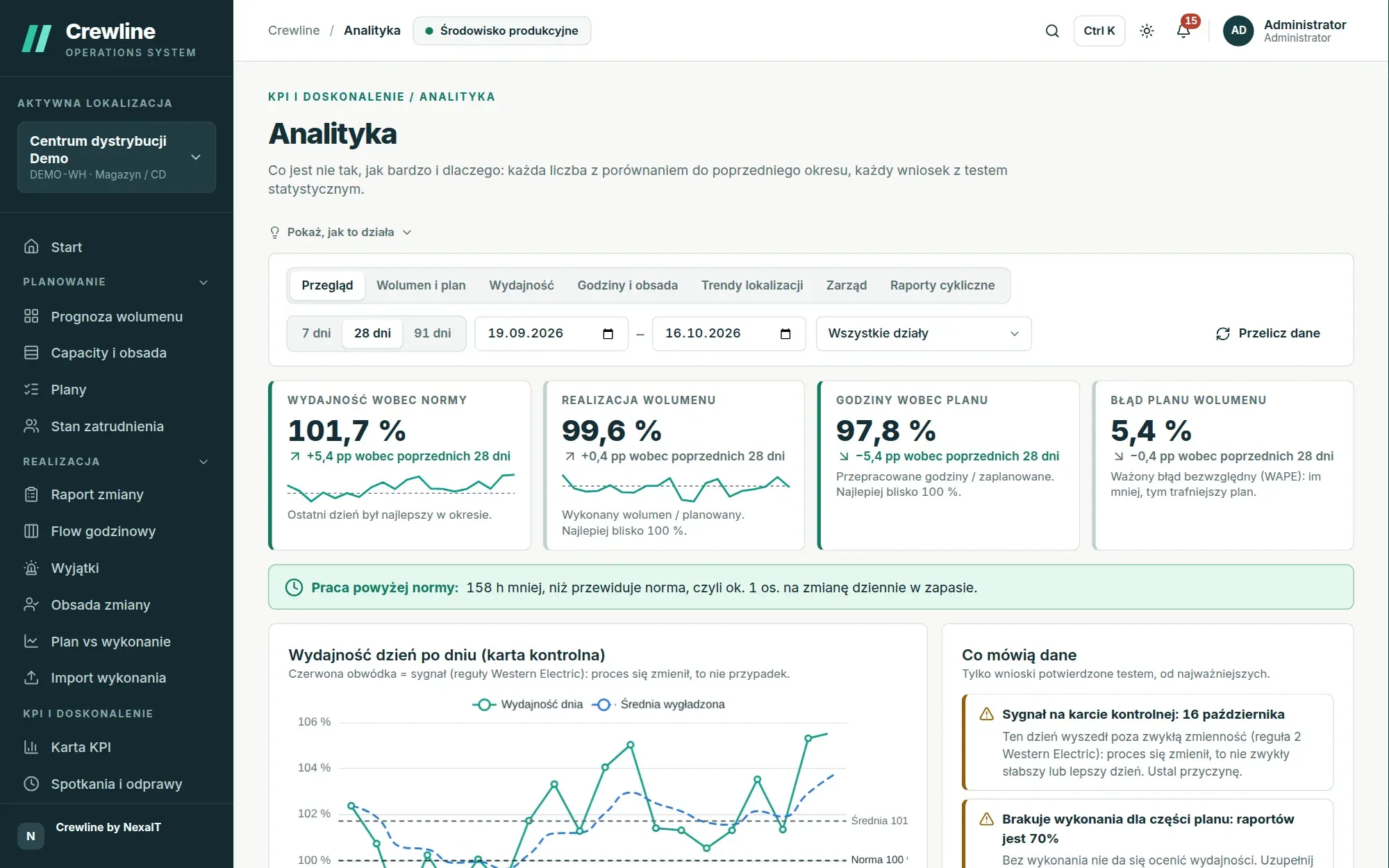
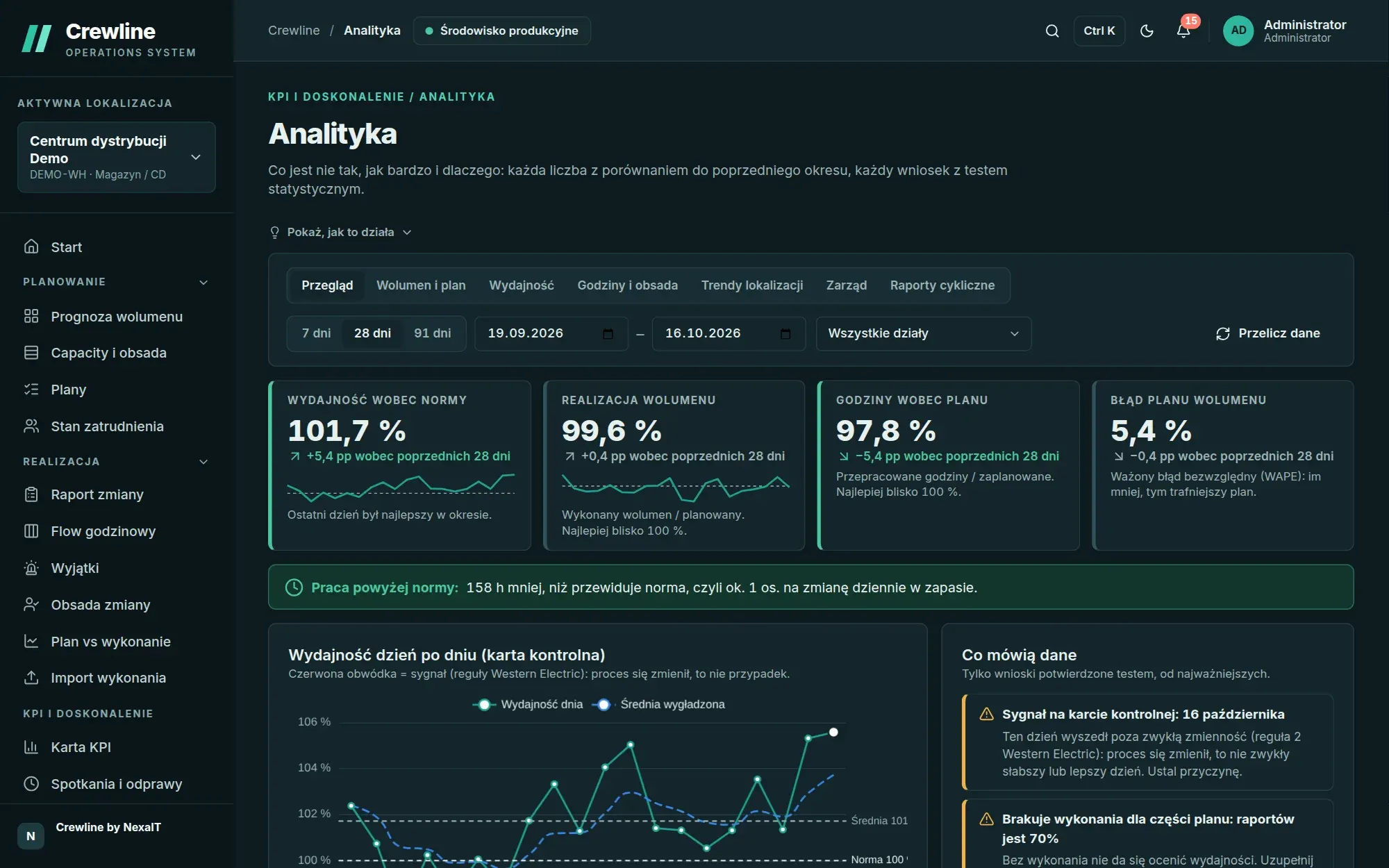
Analytics, Overview: productivity against standard, volume attainment, hours against plan and plan error compared with the previous 28 days, a control chart and a list of findings

5 steps

in one cycle: forecast, staffing, shift, huddle, analytics

210 ms

p95 for API reads with 200 active users (report 2.3)

1700+

automated tests guarding every release

PL and EN

interface, reports and notifications in both languages

Five questions an operations manager asks every day.

How much work will come in, how many people will it need and on which shift will they be short? What happened on the shop floor, what should be done about it at the huddle, and are things better after a few weeks? In most companies each of these questions has its own spreadsheet and its own version of the truth, and someone copies figures from file to file every day.

We built Crewline at NexaIT to turn these five questions into one coherent work cycle. The volume forecast feeds the staffing plan, the approved plan sets the target for the shift, the shift result goes to the KPI sheet and the huddle, and analytics uses a statistical test to check whether a difference is a signal or just noise, and suggests which standard or forecast needs correcting.

See the screens before you book a demo.

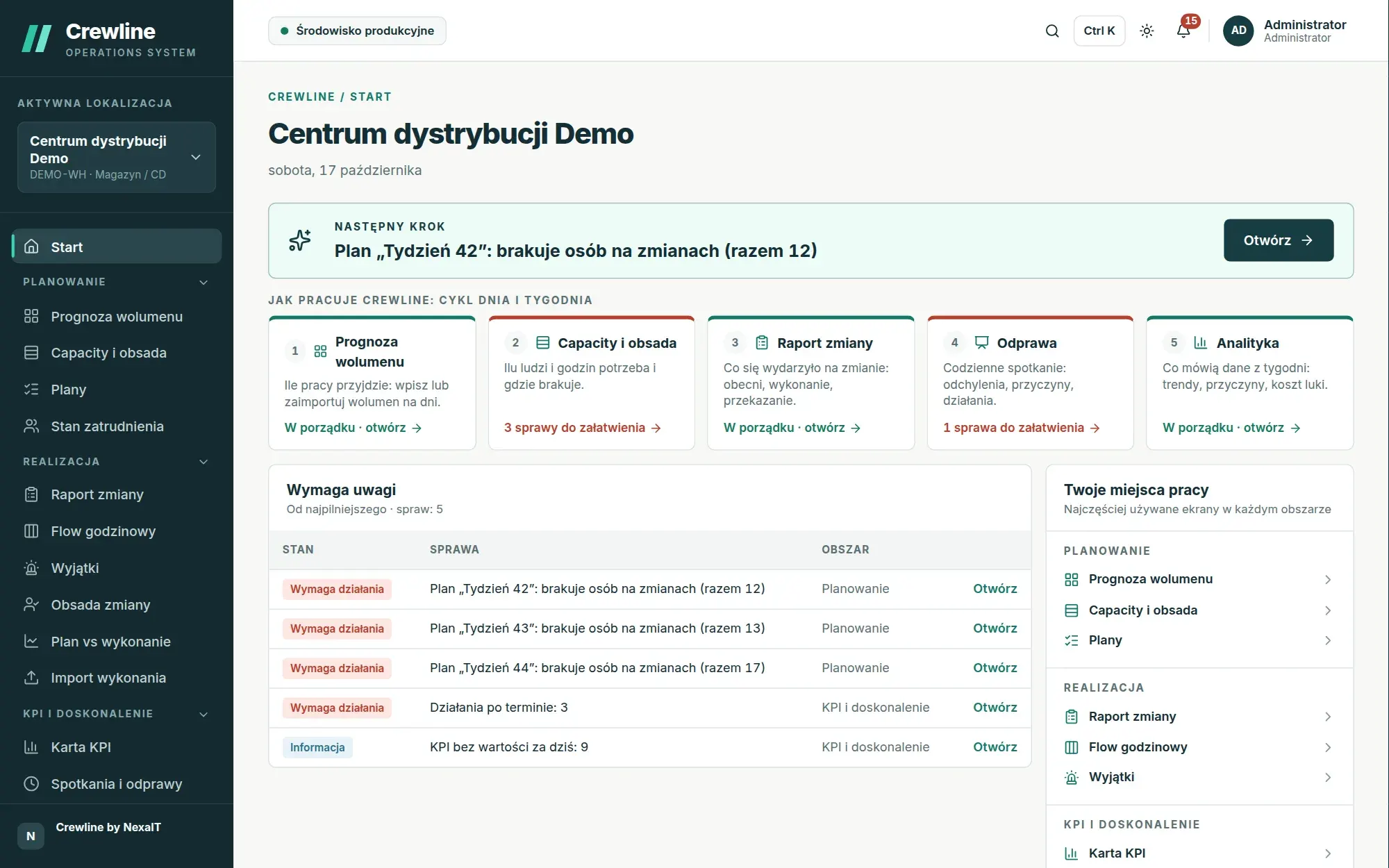
One thing to do right now

The next step with a big button, the daily cycle and the issues that need attention, most urgent first.

Crewline home screen: the next step, the daily and weekly cycle in five steps, and a table of issues that need attention

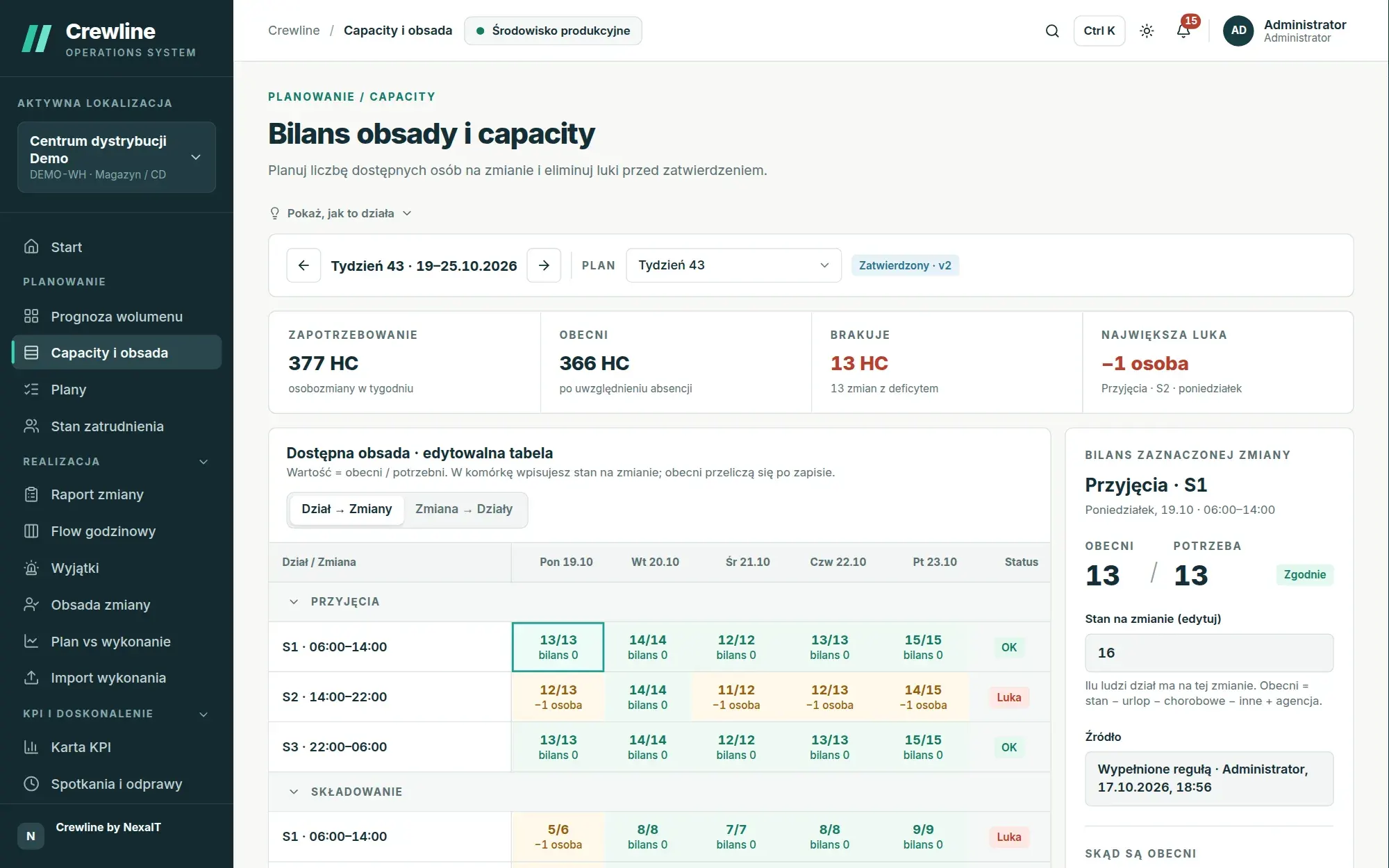
The gap is visible before approval

Each cell compares staff present with staff needed on the shift, and the colour tells you whether there are enough people.

Staffing and capacity balance for week 43: demand of 377 person-shifts, 366 present, a total of 13 person-shifts short on shifts with a gap, and a table of departments and shifts coloured by gap

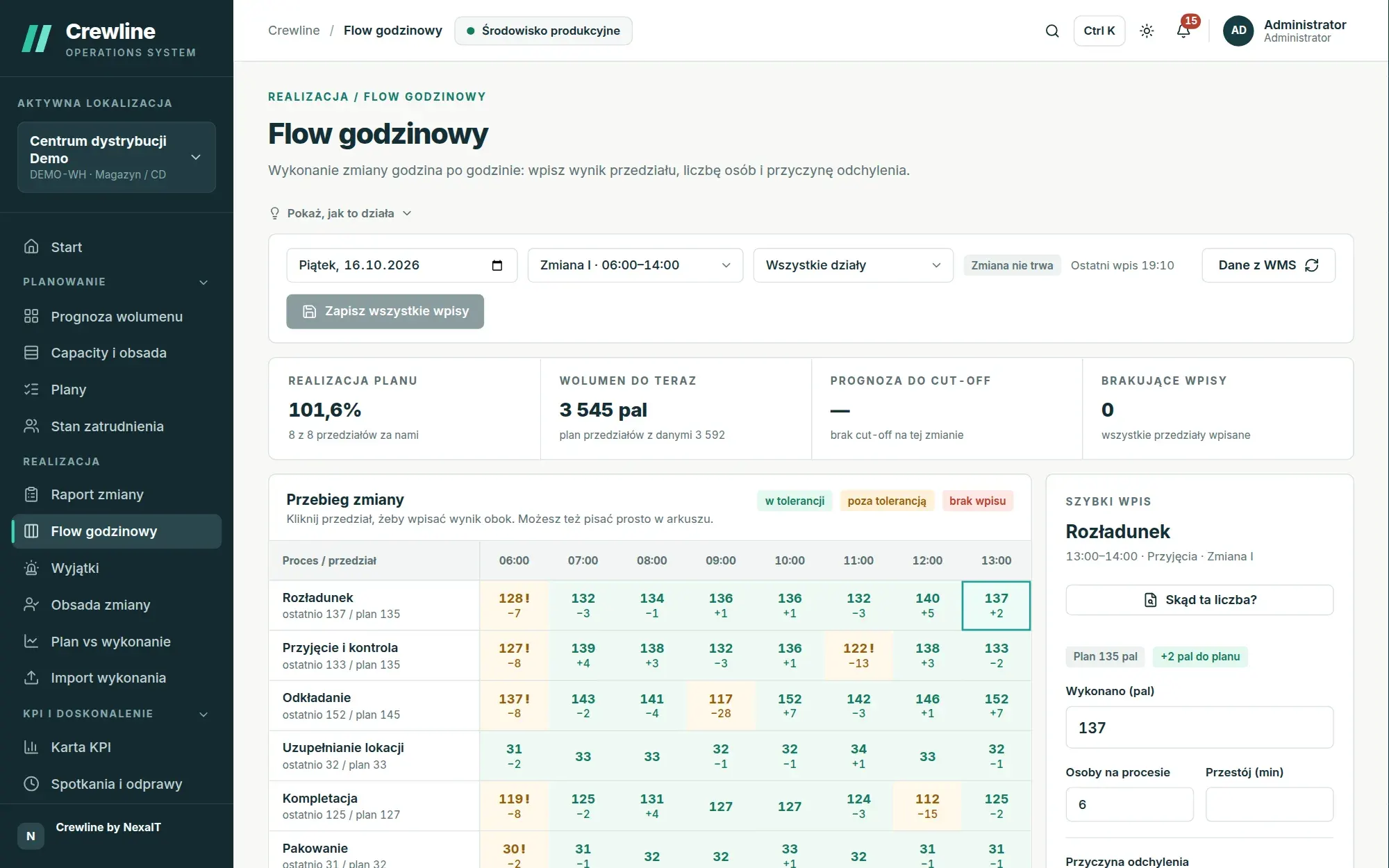
The shift, hour by hour

Each hour’s result against plan, the cause of any variance and an end-of-shift forecast.

Hourly Flow for shift I: each hour’s result against the slot plan, variances outside tolerance and the shift leader’s quick-entry panel

A huddle that leads to decisions

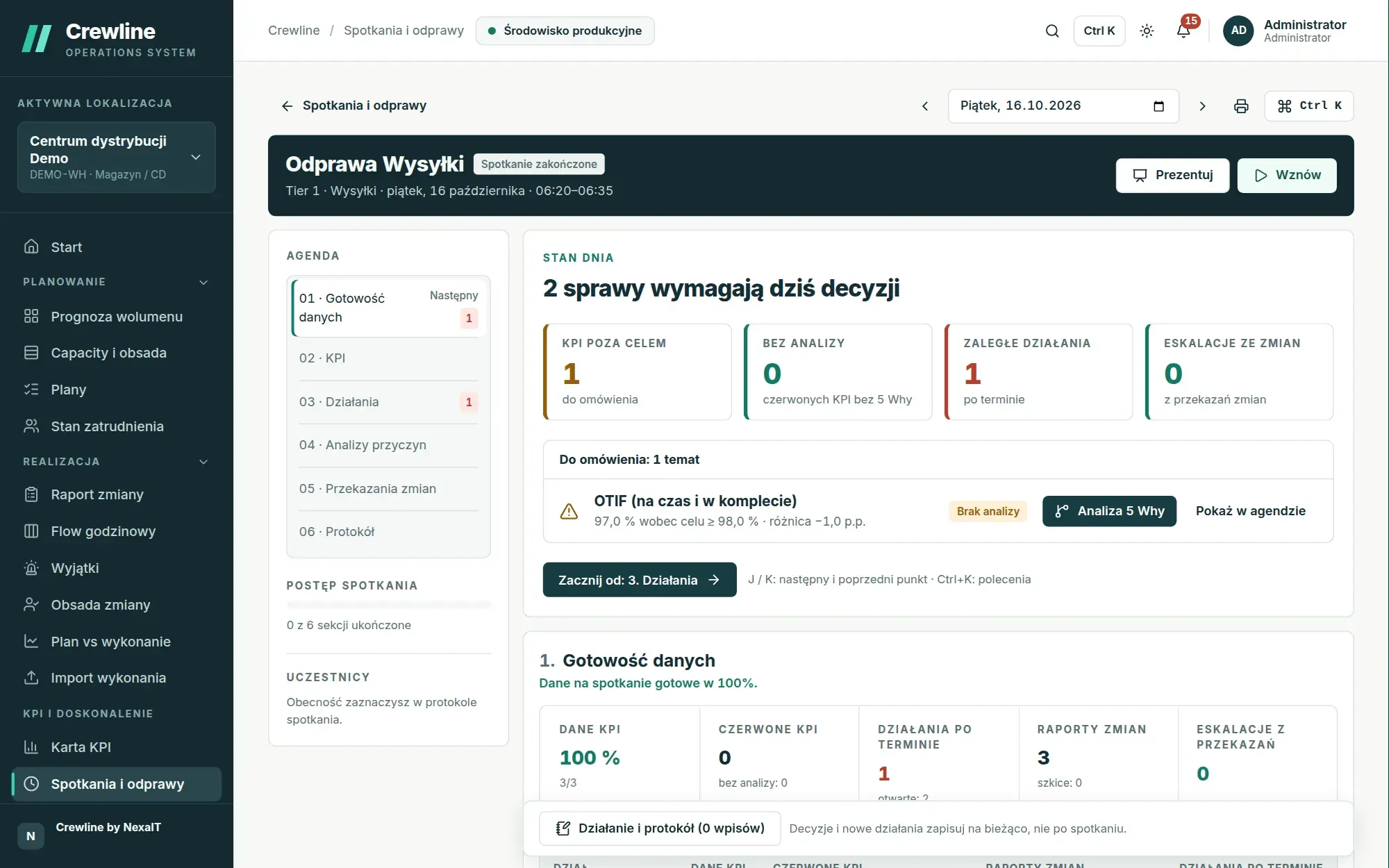
Day status in one sentence, four figures and a 5 Whys analysis for any KPI off target.

Meeting mode for the Dispatch huddle: day status with four figures, a discussion topic with a 5 Whys analysis button, and the agenda alongside

Every finding is tested

Shown here in the dark theme: comparison with the previous period, a control chart and statistically confirmed findings.

The same analytics view in the dark theme

Screenshots from a Crewline 2.3 demo installation. Sites, people and figures are fictitious.

One cycle in a distribution centre, step by step.

This is one cycle in a fictitious distribution centre with three departments and three shifts. The screens come from a demo installation with eight weeks of history, and all the calculations were performed by the application itself on data from the demo data generator.

1. A week ahead

The plan counts people the way a planner does.

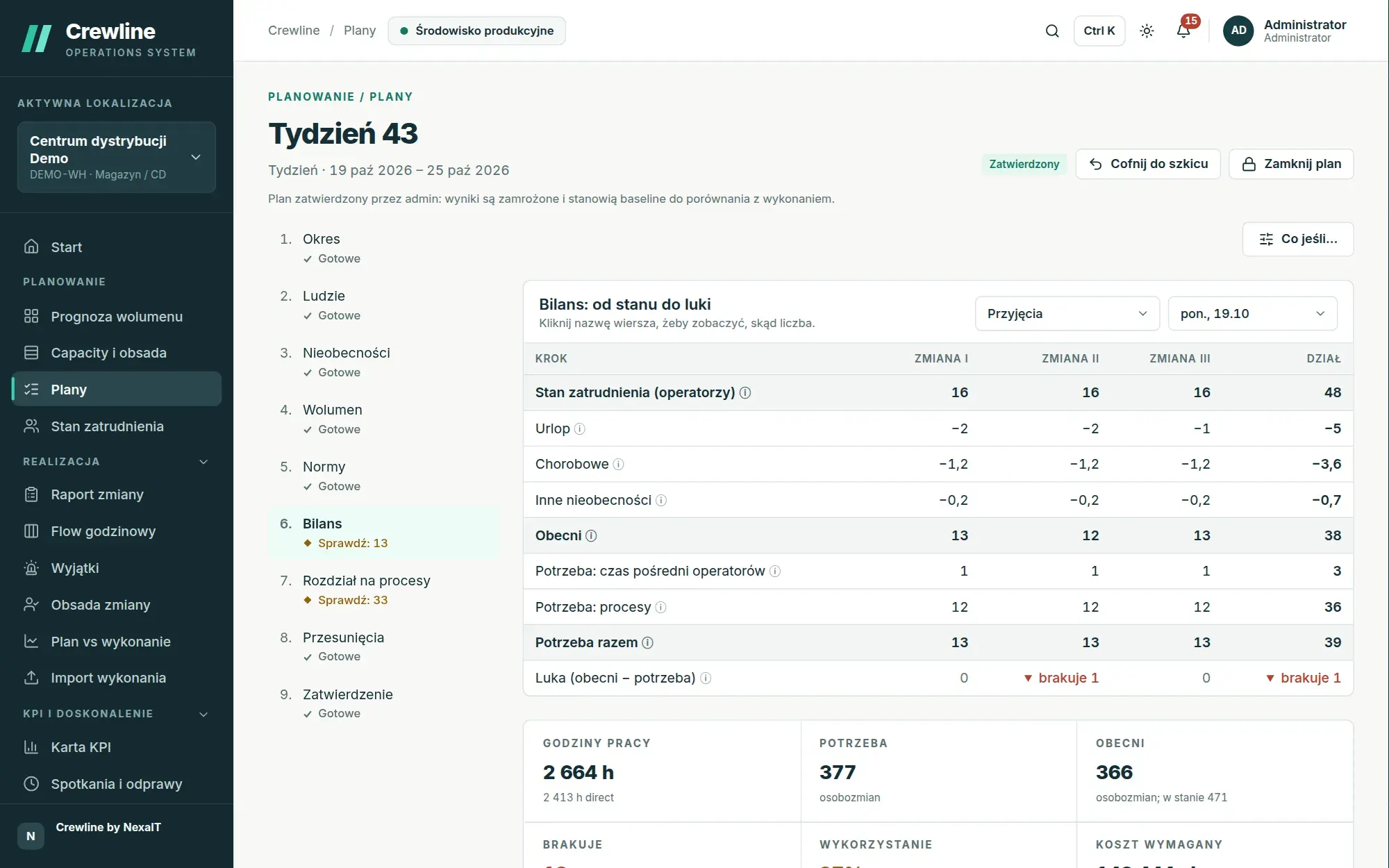
The planner picks a forecast version and creates the weekly plan. Crewline follows the same route as an experienced planner: from the staffing baseline it subtracts holiday leave, sick leave and other absence, adds agency staff, taking their attendance rate into account, and then compares the people present with the need derived from volume and productivity standards.

  • the gap calculated separately for each department, day and shift
  • the plan as a list of nine steps, each marked “Done” or “Check”
Weekly plan as a list of nine steps and the Balance step: from the staffing baseline through holiday leave, sick leave and other absence to present staff, need and gap
Week 43 plan, Balance step. Demo installation, fictitious data.

2. Start of the shift, 6:00

Shift staffing in a few seconds.

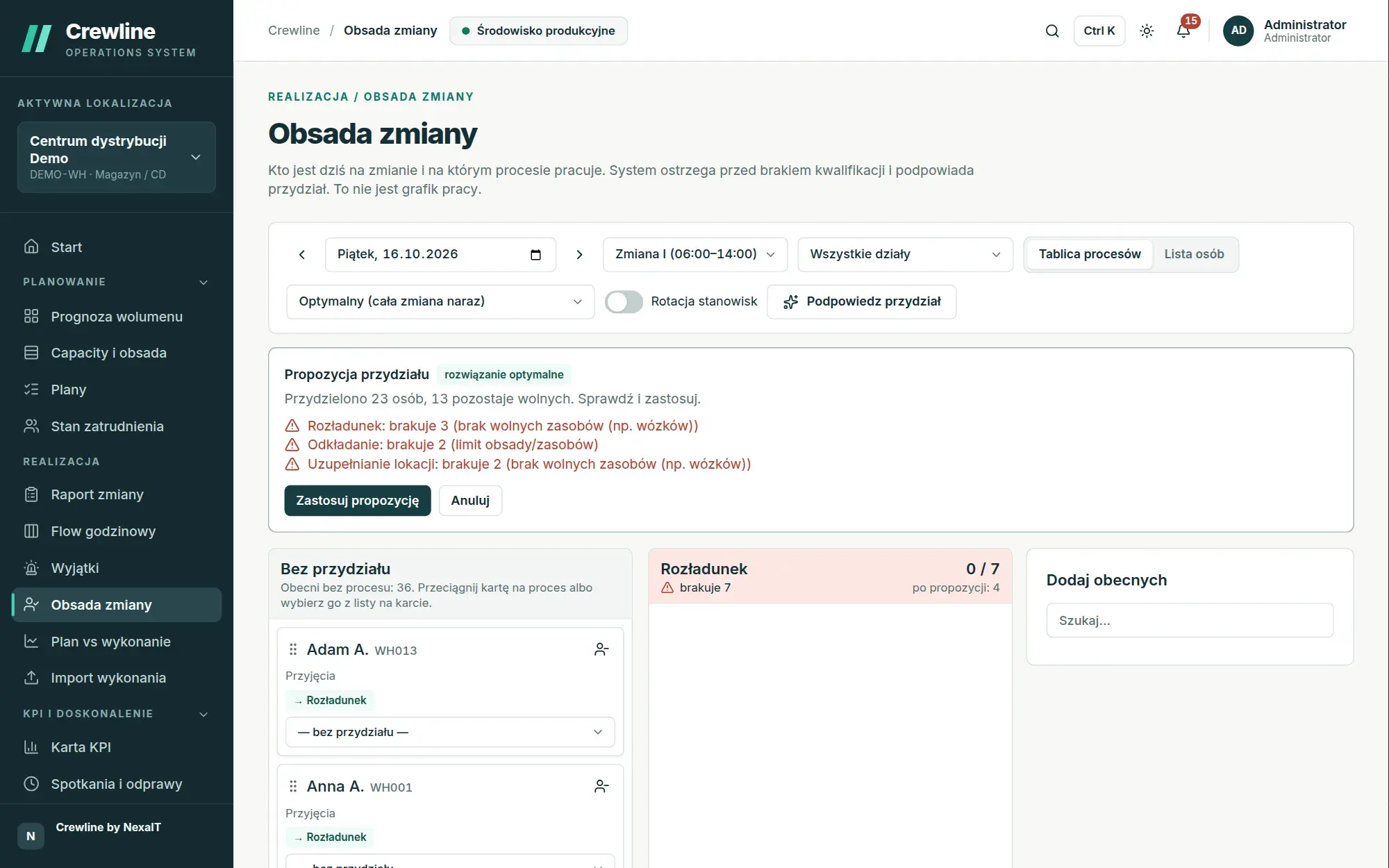
The shift leader marks who is present and asks for an assignment suggestion. The optimiser staffs the whole shift at once, taking into account qualifications, staffing limits, shared resources such as forklifts, and home departments, and when something is short, it says plainly what and why.

  • optimal assignment, or quick assignment that starts with rare qualifications
  • a warning when someone is assigned to a process without valid certificates
Shift staffing: a proposed optimal assignment of the crew present to processes, with information on what is short
Proposed optimal assignment. Demo installation, fictitious data.

3. During the shift

Flow shows a variance before it becomes a problem.

Every hour the shift leader enters the output, headcount and any downtime, unless the data comes straight from the WMS. A cell outside tolerance turns yellow and the shift leader gives the cause of the deviation, with an exclamation mark flagging a missing cause, so the manager sees not only that things are worse but also why.

  • slots every hour, every 30 or 15 minutes, or at checkpoints
  • eight variance cause categories, with names set by the site
Hourly Flow for shift I: each hour’s result against the slot plan, variances outside tolerance and the shift leader’s quick-entry panel
Hourly Flow for shift I. Demo installation, fictitious data.

4. The next morning, 6:20

The huddle starts with what needs a decision.

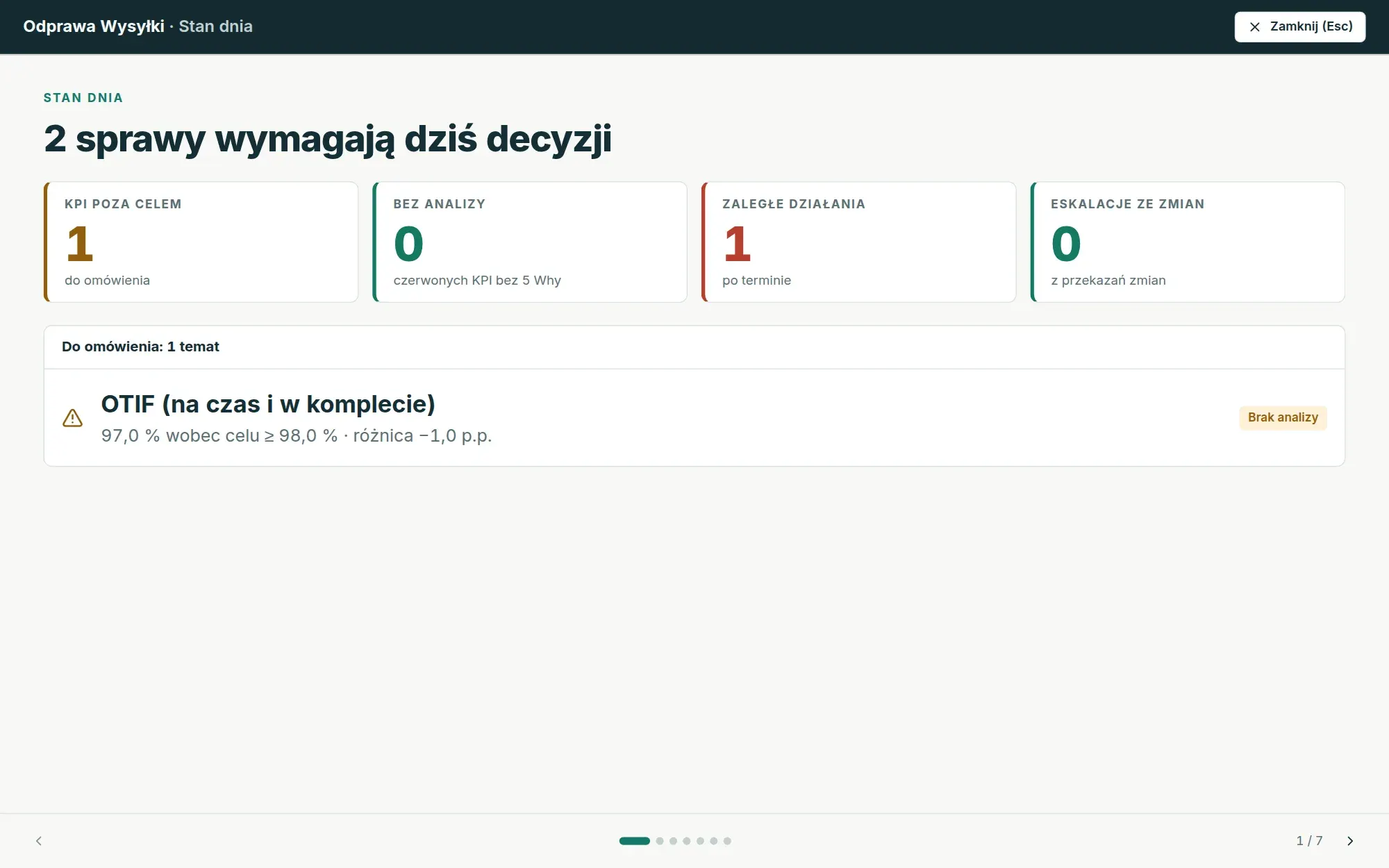
The facilitator opens meeting mode, or goes straight to presentation mode on the screen in the room. The first slide says how many issues need a decision today, and the following agenda chapters work through KPIs off target, root-cause analyses, overdue actions and shift handovers.

  • figures frozen for the meeting, so everyone discusses the same values
  • actions with an owner and due date added without leaving the meeting
Present mode in full screen: the Day status slide concluding that two issues need a decision today
Present mode, Day status slide. Demo installation, fictitious data.

5. After four weeks

Analytics tells you whether things really are better.

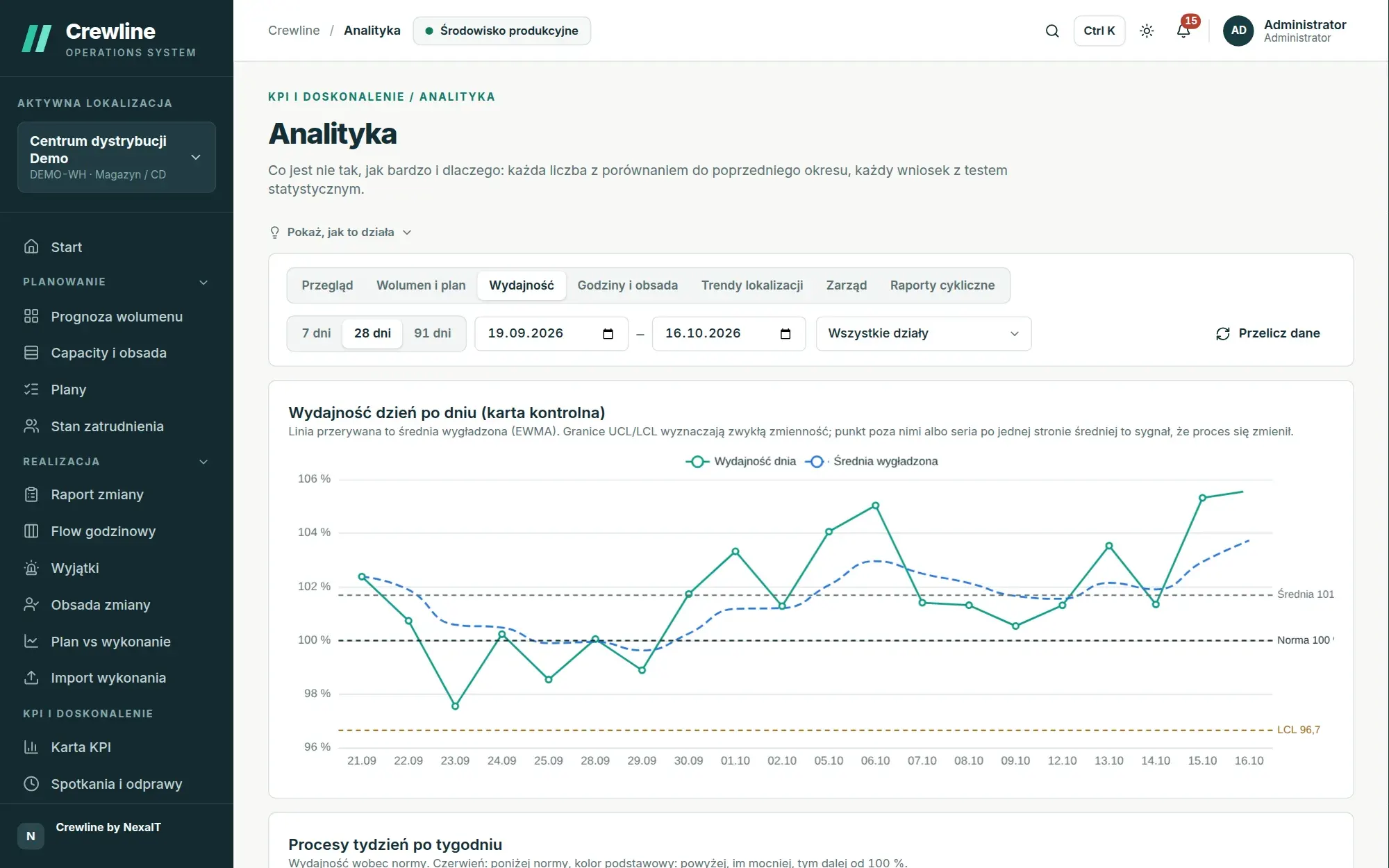
The manager compares the last four weeks with the previous four. The control chart separates ordinary variation from a signal, the trend test says whether productivity is rising, and the decomposition of the productivity change shows how much comes from work pace and how much from a different process mix.

  • a finding appears only when a test confirms it
  • gap cost in hours and in people per shift
Analytics, Productivity view: control chart of daily productivity with variation limits, a smoothed average and a 100 per cent standard
Analytics, productivity control chart. Demo installation, fictitious data.

How Crewline counts people: from baseline to gap.

The plan does not start from demand but from the people you actually have. For a department with a staffing baseline of one hundred people and, in a given month, 9.5% holiday leave, 6% sick leave and 2% other absence, the calculation looks like this:

Example calculation of present staff for a department of one hundred people
Department staffing baselinefrom the Staffing baseline, valid from the selected day100 people
Holiday leave 9.5%9.5 people rounded up to whole people and split across shifts as 4, 4 and 210 people
Sick leave 6%percentage from the absence settings for the department and month6 people
Other absence 2%any other absence, recorded only as numbers2 people
Present on the shop floorafter adding agency staff (zero in this example), rounded down82 people

The plan then calculates the need from volume and productivity standards, and the gap is the difference between present staff and need on each shift. Risk is judged by the gap, not by utilisation, because rounding to whole people means even a healthy plan shows utilisation of 90 to 99%.

Everyone sees their own part, and everyone works from the same figures.

You assign roles scoped to the whole organisation, a single site or a department, so a department manager changes only their own figures, while executives see every site without the right to change plans or KPIs.

  • Planner and department managerForecast, weekly, monthly and quarterly plans, what-if simulation and transfers of people between departments.
  • Shift leaderShift staffing with assignment suggestions, Hourly Flow and the shift report, including from a tablet without a permanent network connection.
  • Site managerPlan vs actual, KPI sheet, huddles, actions with due dates, and productivity standards that flag when they have gone stale.
  • Executives and operations directorA scorecard across all sites, trends, the SQDCP calendar and reports emailed on a schedule.
  • IT administratorDocker installation, company sign-in via OpenID Connect, roles with a defined scope, a change log and backups with restore tests.

A spreadsheet works as long as only one person uses it.

Many companies still plan staffing in Excel or Google Sheets and copy KPIs into slides before every meeting. Below are the differences you notice in the very first week with Crewline.

Crewline compared with planning and reporting in spreadsheets
AreaCrewlineSpreadsheets and presentations
Staffing planOne plan for the whole site, with department sections and a full edit historyA file held by one person, with new versions circulating by email
Gap on the shiftCalculated from holiday leave, sick leave, agency staff and productivity standards for each shiftWorked out in someone’s head or on a separate tab
Productivity standardsBudget, engineered and achieved side by side, with a proposed updateEntered once and rarely updated
ActualsFrom WMS, ERP, MES, file import or shift leader entry, with a history of sourcesRetyped by hand from several systems
HuddleDay status, 5 Whys analysis and actions that carry over to the next meetingSlides rebuilt from scratch before every meeting
AnalysisA finding only when a statistical test confirms itA chart, with interpretation depending on who reads it

What Crewline is not, so you know from the outset.

Crewline is operations software, not HR software. It plans how many people and how many hours each process and shift needs, and on the shift itself it assigns the crew present according to operational qualifications. It does not, however, build named rosters, collect holiday requests, store reasons for absence or employment contracts, or check compliance with employment law.

Nor does it replace your WMS, ERP or MES; it works alongside them. It takes volumes and actuals from them via API, file import or manual entry, and in return provides what those systems usually lack: a staffing plan, huddles and operational analysis.

Operations and finance features which we roll out together with you.

Four extensions are part of the product but are switched off by default. An administrator turns them on in the “Features in preview” screen, and we roll them out together with you. This keeps the first weeks of deployment focused on the plan and huddles, with costs and impact added once the actuals data is reliable.

  • Exceptions inboxIssues that need an immediate response: a process will miss the cut-off, people are short, or a system has stopped sending data.
  • Response optionsMoving people, overtime and agency staff side by side, with the impact, cost and risk of each option.
  • Labour costBudget, actual and earned cost, with the variance broken down into volume, productivity and rate.
  • Decision impact registerThe impact of an initiative after adjusting for volume, mix and rates, approved by the owner and the finance department.

Specification, no small print.

Before release, Crewline passes more than 1,700 automated tests, security tests with active OWASP ZAP scanning and a load test with response-time budgets. You will find the full measurement results on the page Deployment.

Installation

  • Linux with Docker and Docker Compose
  • PostgreSQL 16, Valkey 8 and a Caddy server with HTTPS
  • can run without internet access, a CDN or telemetry
  • updates with automatic database migrations
  • daily database backup with a restore test
Deployment and requirements

Security

  • argon2id passwords, httpOnly sessions with a CSRF token
  • company sign-in via OpenID Connect, e.g. Microsoft Entra ID
  • role scope: organisation, site or department
  • crew pseudonymisation and a data access log
  • 380 attack and authorisation tests, OWASP ZAP scans
Security and GDPR

Integrations

  • REST API with 340 operations documented in OpenAPI
  • tokens restricted to site and scope
  • webhooks signed in line with the Standard Webhooks specification
  • Python SDK with a folder agent and ready-made n8n workflows
  • Teams, Slack, Google Chat and email
All integrations

Questions about Crewline.

How does Crewline differ from a rota or a WFM system?

Rotas and WFM systems schedule specific people for specific hours. Crewline plans the operation: how much work will arrive for each process, how many people and hours each shift needs, where a gap will open and how to close it, and then compares the plan with actuals and runs the huddles. It deliberately does not handle named rotas, holiday leave or HR data.

Will Crewline replace our WMS or ERP?

No, that is not its job. Crewline works alongside your WMS, ERP and MES, takes volumes and actuals from them via the API or files, and adds staff planning, huddles and analytics.

Who is Crewline for?

For warehouses, distribution centres, e-commerce fulfilment, assembly plants, paint shops and food production: anywhere work can be measured by volume and a standard. The system supports multiple sites, departments and shifts, including shifts that run past midnight.

Does Crewline run in the cloud or on our server?

On your server: on your corporate network or on a server you rent in the cloud. Everything runs in Docker containers, can work without internet access and sends no telemetry or data to NexaIT. Data leaves only through channels you configure yourselves, such as email, Teams, Slack or webhooks.

How much does Crewline cost?

We set the price after the demo, because it depends on the number of sites, the scope of deployment, integration with your systems and whether you want us to maintain the system after go-live. The quote covers the licence, deployment and optional support in a single offer.


Online demo · no obligation

See Crewline live, using your own processes as the example.

  1. Online demoWe walk through the full cycle on demo data from a distribution centre and an assembly plant, then ask about your processes, your shifts and the spreadsheets you plan in today.
  2. QuoteWe quote the licence, deployment and optional support for your company in a single offer, prepared after a conversation about scope.
  3. Installation and configurationA server on your network or one you rent in the cloud, an industry template, processes, process flows, standards and data migrated from your spreadsheets.
  4. Go-live with your teamThe first plan, the first huddle and training for planners, shift leaders and managers on the screens they will be using.