

From cables on the windowsill to a manageable network.
A trading and services company with a warehouse was running on an internet connection that kept dropping, with no Wi-Fi and its ERP system on an ordinary office PC. We rebuilt the infrastructure from the internet connection to the cameras: cabling, rack, network, Wi-Fi, backup power and CCTV.
Case study · anonymous client
- Industry
- trade and services, with a warehouse and yard
- Scale
- 7 workstations, printers, ERP system
- Region
- Lubuskie, a town without fibre broadband
- Model
- phased project, from diagnosis to documentation
- 5G connection
- Server rack
- Cabling
- UniFi network
- Wi-Fi 7
- VLAN
- UPS
- 4K CCTV
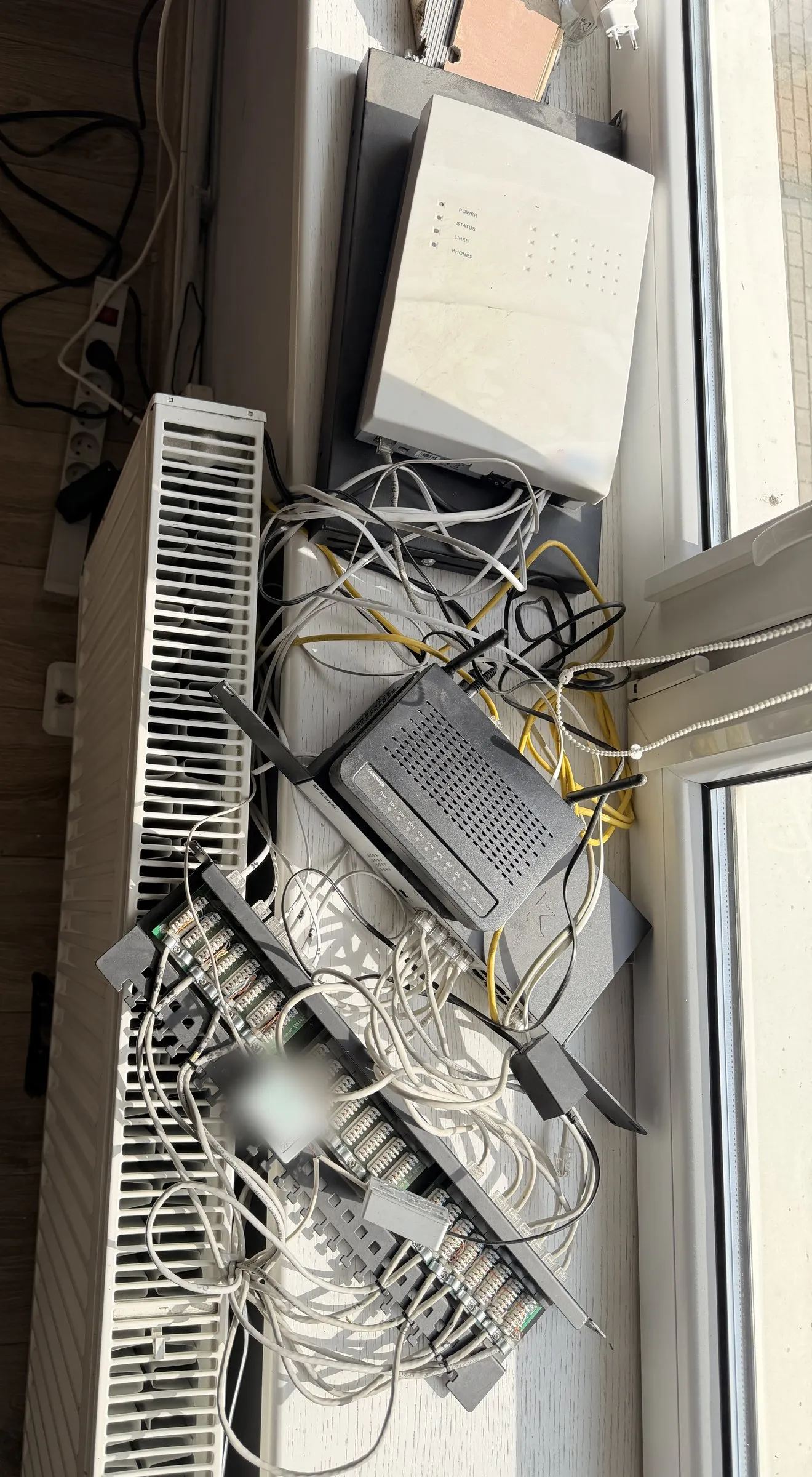
What it looked like before we started
A set-up like this rarely appears overnight. It builds up over years: someone adds a router, someone extends a cable, and the knowledge of what's plugged in where stays in one person's head.
- Network and phone equipment sat on a windowsill above a radiator, exposed to dust, heat and the occasional accidental tug.
- The cables were unlabelled, so every fault started with working out which cable was which.
- According to the documentation, the connection managed about 1-5 Mb/s and dropped out regularly.
- The business had no reliable Wi-Fi network, and fibre wasn't available in the town.
- Some devices were no longer receiving updates from the manufacturer.
- The ERP system ran on an ordinary office PC with a single drive and a single power supply.
- There was no CCTV and no confirmed, tested backup.
What we did, step by step.
Diagnosis and choice of connection
First, an inventory: devices, connections, workstations and dependencies. Then the internet connection. With no fibre available, we compared satellite internet and 5G, tested the signal on site and set up 5G with an external modem.
Server rack and new cabling
A 19-inch 20U rack as a single distribution point. New structured cabling to workstations and devices, terminated on a patch panel and labelled at both ends. Every run tested for continuity.
A network managed from one place
A UniFi Dream Machine Pro gateway with firewall, a 24-port PoE switch and three Wi-Fi 7 access points: two indoors and one outdoors covering the yard. Everything is visible in one console.
Network zoning
Separate VLANs for the office, server and management, CCTV, IoT devices and guests. A camera or a visitor's phone is not on the same network as computers holding company data.
Backup power and sensors
A UPS for the network equipment and video recorder, plus temperature and humidity sensors in the rack, so overheating is spotted before it damages equipment.
CCTV
Six 4K cameras: two inside the building and four outdoors and in the warehouse. Footage is recorded locally in UniFi Protect on a 12 TB drive rated for continuous operation.
Documentation and handover
A list of devices and their roles, a description of network zones, port labels, administrative access and as-built documentation. Someone who wasn't there for the installation should be able to support the environment.
Before and after, no made-up numbers.
| Area | Before | After |
|---|---|---|
| Distribution point | Devices on the windowsill above the radiator | One rack with a UPS and sensors |
| Cabling | Unlabelled cables | New cable runs, patch panel, labelled ports |
| Internet | A slow connection that kept dropping | 5G connection chosen after on-site measurements |
| Wi-Fi | No business wireless network | Three Wi-Fi 7 access points, indoors and in the yard |
| Network security | Everything in one network | Separate zones for the office, server, cameras, IoT and guests |
| Monitoring | No cameras | Six 4K cameras with local recording |
| Troubleshooting | Guessing which cable and which device | A shared view of devices, ports and clients |
What we deliberately don't claim
A good case study also shows its limits. We don't claim the following, because they weren't in scope or we have no measurements for them:
- A server for the ERP system, backups or ongoing support. That's the next stage and hasn't been implemented yet. Until then, ERP on an office PC remains a risk, not a solved problem.
- Certified cabling test results. We tested the runs for continuity, which is not the same as a certification report.
- A full cybersecurity audit. Network zoning is a foundation, not a complete set of safeguards.
- A specific connection speed, video retention period or UPS runtime. We don't publish these figures without a documented test.
- That local camera recordings are a backup. They aren't. An off-site copy is a separate decision.
The biggest change isn't in the photo
Neatly laid cables are a side effect. The real result is that today you know what the network consists of, what is connected where, how it is powered and who has administrator access. The next stage will be built on this foundation: a server for the ERP with backups. Along the way another topic came up for later: simplifying how documents are passed to the accounting office.
Free · 60 minutes online · no obligation
Do you have a similar network to put in order or a similar question?
- You talk to an engineerOnline, by video call. Not with a salesperson. We don't install or change anything.
- We check 8 areasBackups, access, network, email, server, licences, protection and KSeF readiness.
- You get a scorecardThree priorities on one page, emailed after the meeting. Yours to use however you like.
office@nexait.plMessage us on WhatsApp
We don't use a contact form, but we answer the phone and reply to emails and WhatsApp messages during working hours.