

How to calculate shift staffing in a warehouse or plant: from volume to gap
How many people tomorrow’s shift needs comes down to four figures: volume, the productivity standard, productive time and absence. We walk through the calculation step by step using picking as an example, explain why you must round on each shift separately and why risk is judged by the gap rather than by utilisation.
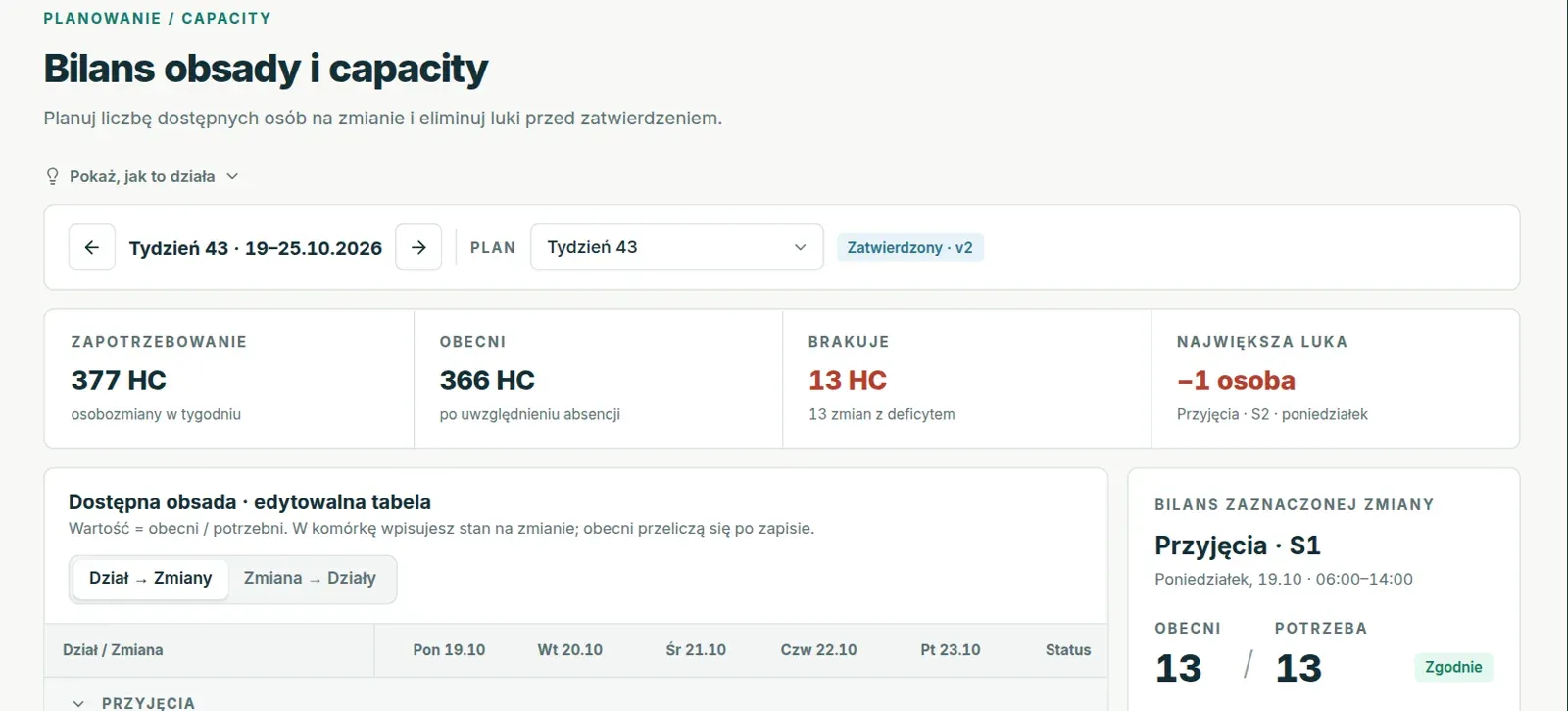
In most warehouses and manufacturing plants, next week’s staffing is set by one person in a spreadsheet that only they understand. The spreadsheet works while volume stays similar from week to week, but with a promotion, a new customer or a wave of sickness it starts producing figures that do not match what you see on the shop floor. Usually the culprit is not the spreadsheet itself but a calculation that skips one of the steps described below.
Below we go through the whole calculation for a single process: picking in a distribution centre that runs two shifts. The same steps apply in manufacturing, except that instead of order lines you count units, pallets or the work of entire production lines.
Step 1: volume for each shift separately
The starting point is the volume forecast, in other words how much work will come in. Let us assume Thursday’s picking forecast is 9,600 order lines. The work is not spread evenly over time, though: most orders arrive in the afternoon, and the carrier’s departure at 18:00 sets the point by which the day’s work must be finished.
That is why the day has to be split into shifts according to the actual inflow. If history shows that 40% of the work falls on the morning shift and 60% on the afternoon shift, the calculation looks like this:
| Shift | Share | Volume |
|---|---|---|
| I, 6:00 to 14:00 | 40% | 3,840 lines |
| II, 14:00 to 22:00 | 60% | 5,760 lines |
When the warehouse carries over a backlog from the previous day, it is added to the first shift’s volume: backlog plus what comes in gives the work to be done.
Step 2: hours from the productivity standard
The productivity standard states how many units of work one person completes in an hour, which in logistics is usually expressed as UPH, units per hour. With a standard of 120 lines per hour, the morning shift needs 3,840 ÷ 120 = 32 labour hours and the afternoon shift 5,760 ÷ 120 = 48 labour hours of direct work.
The key question is which standard to use. The budget standard comes from the financial plan, the engineered standard from work measurement, and the achieved standard is the pace people actually sustain over recent weeks. A plan based on a standard that no longer reflects reality systematically understates the need, so it pays to compare the standard with the pace from actuals from time to time and decide deliberately which one the plan should use.
Step 3: productive time per person
An eight-hour shift does not give eight hours of work on the process. Paid and unpaid breaks are deducted from the shift length, and some companies also apply a fixed allowance for personal needs and fatigue. With two 15-minute breaks, one person provides 7.5 hours of productive time.
So the calculation is: the morning shift needs 32 ÷ 7.5 = 4.27 people and the afternoon shift 48 ÷ 7.5 = 6.4 people.
Step 4: indirect work
Besides picking, someone has to replenish locations, prepare trucks, clean the area and deal with exceptions. This indirect work is counted either as fixed roles per shift or as a percentage of direct work, and in some companies team leaders cover part of it. If indirect work makes up 10% of total time, we divide the need by 0.9:
- shift I: 32 ÷ 0.9 = 35.6 hours, or 4.7 people;
- shift II: 48 ÷ 0.9 = 53.3 hours, or 7.1 people.
Step 5: rounding on each shift separately
Nobody plans a fraction of a person, so the need has to be rounded up. This is done at shift level rather than day level, because people on the morning shift do not work the afternoon shift:
| Shift | Need in people | After rounding |
|---|---|---|
| I | 4,7 | 5 |
| II | 7,1 | 8 |
| Total | 11,8 | 13 |
If you only rounded the daily total, you would get 12 people, one fewer than you actually need. It is one of the most common spreadsheet mistakes, and with several processes and three shifts it can hide several missing people.
Step 6: from the staffing baseline to the people present
Now the other side of the balance: how many people will actually be on the shop floor. The plan should start from the staffing baseline, meaning how many people the department has assigned to the shift, and subtract the expected absence. Let us assume the afternoon shift has a baseline of 10 people and that this month holiday leave accounts for 9.5%, sick leave for 6% and other absence for 2%:
| Step | Number of people |
|---|---|
| Staffing baseline, shift II | 10 |
| Holiday leave 9.5%, rounded up | minus 1 |
| Sick leave 6% | minus 0.6 |
| Other absence 2% | minus 0.2 |
| Present, rounded down | 8 |
Holiday leave is rounded up because a whole person takes leave, and the people present are rounded down because the plan cannot count on a fraction of a person on the floor. If you order agency staff, they are added multiplied by the attendance rate, for example 90%, because not everyone you order will turn up.
Step 7: the gap instead of utilisation
The last step is to compare the people present with the need. On the afternoon shift 8 people are present against a need of 8, so the balance holds. On the morning shift, with a baseline of 6 people and the same absence rates, 4 people will be present against a need of 5, so you are one person short.
Many spreadsheets show utilisation at this point, the ratio of hours needed to hours available. It is a misleading indicator: because of rounding to whole people, even a healthy plan shows utilisation of 90 to 99%, and a shift one person short can look better than a shift with a surplus. Risk is judged by the gap, the difference between people present and the need, calculated separately for each department, day and shift.
What to do about the gap
When the gap is known a few days in advance, there are several ways to close it: move people from a department with a surplus on the same shift, schedule overtime, order more agency staff, or shift part of the work to a shift with spare capacity, as long as the carrier’s departure time allows it. Each option carries a different cost and a different risk, so it is worth comparing them in figures before the plan goes for approval.
After the shift it is worth returning to the calculation to check whether volume and pace matched what the plan assumed. If the forecast regularly overstates or understates volume and the standard drifts away from the pace in actuals, every subsequent plan repeats the same mistake.
When a spreadsheet is no longer enough
This calculation can be built in Excel for one process and two shifts. The trouble starts with a dozen or more processes linked by a flow, three shifts, several departments moving people between them and several people editing the same file at once. Every change to the forecast then means recalculating the whole week by hand, and comparing the plan with actuals still has to happen in a separate spreadsheet.
For companies like these, we at NexaIT built Crewline, a system that performs exactly this calculation for every process, department, day and shift, shows the gap before the plan is approved, then compares the plan with actuals and runs the morning huddles. We describe how the application performs the calculation on the page about staff planning.