

NNexa Hub 1.2 · a ticketing system by NexaIT
Integrations: Teams, Google Chat, Slack and your own systems.
The team does not need to sit watching the queue to know an urgent ticket has arrived. Nexa Hub sends messages where the department already talks and signs people in with the account they already have.
Microsoft Teams, a card with a button.
In Teams you create the “Post to a channel when a webhook request is received” flow in the Workflows app and paste its URL into Nexa Hub. Every event arrives as an Adaptive Card with the title, department, status, priority, requester, assignee, location and an “Open ticket” button.
We use Workflows because Microsoft is retiring the old Office 365 connectors and Incoming Webhook. A deployment built on them would stop working at the least convenient moment.
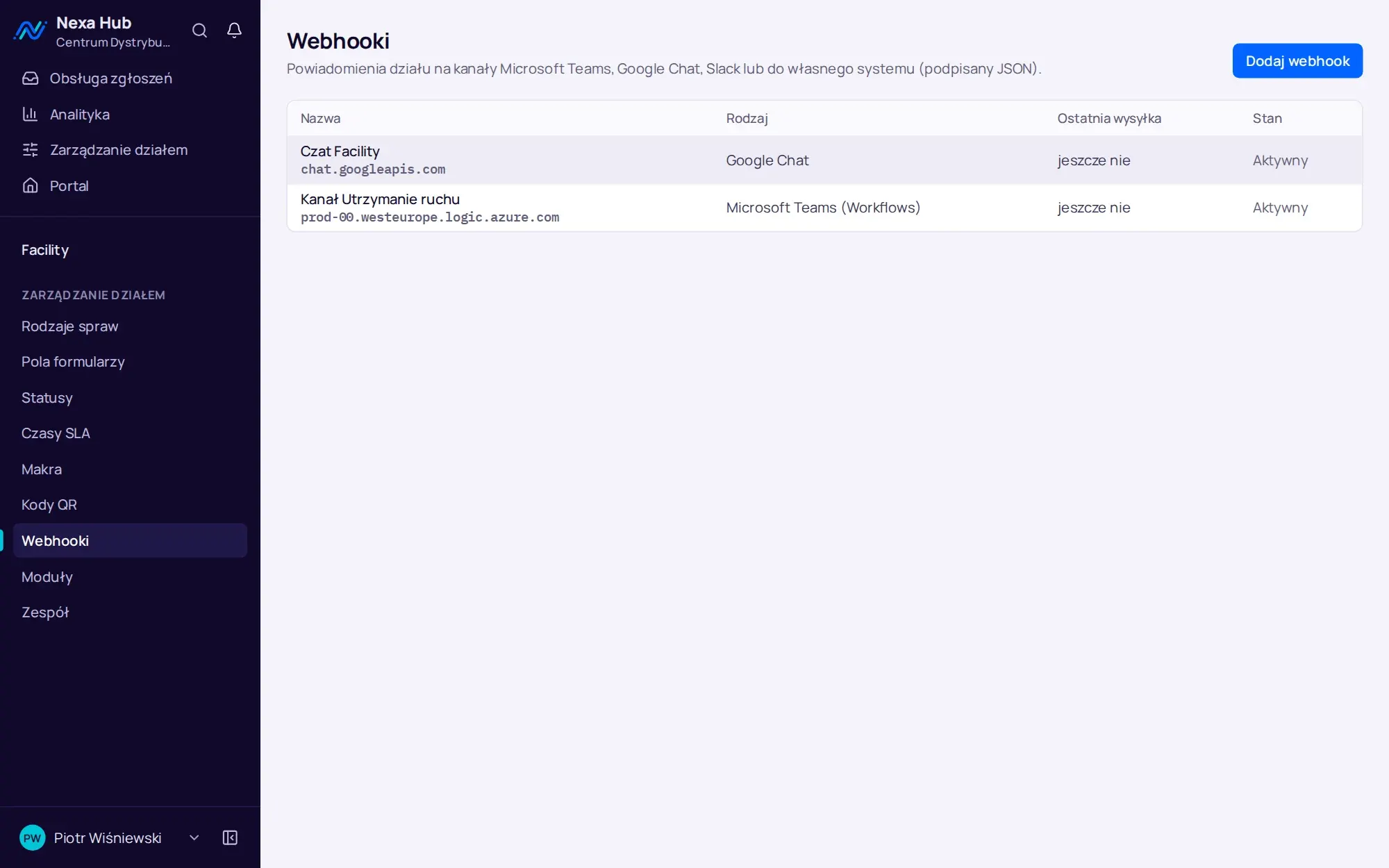
A department can have several webhooks at once, for example one channel for the whole team with new tickets and another for the manager with breached SLA deadlines only. Each webhook can be switched off temporarily without deleting it, for instance while a Teams channel is being rebuilt.
Google Chat and Slack. One thread per ticket.
In Google Chat, messages about one ticket go into a single thread, so the space does not turn into a stream of random notifications. In Slack the message uses Block Kit with the same information as in Teams.
For each webhook you choose the events: new ticket, assignment, status change, team reply, requester reply, reopening, approaching and breached SLA deadline, transfer from another department. “Send test” sends a message immediately and shows the server's response, and the recent deliveries list shows the state of every message.
- up to 6 retries when the receiving side returns errors
- internal notes never go out in webhooks
- public replies summarised to 500 characters
Your own system: JSON with an HMAC signature.
If tickets should reach your own system, such as an ERP, an automation platform or an in-house application, Nexa Hub sends a POST request with the ticket data in JSON. The headers contain the event type, a delivery identifier for deduplication, a timestamp and an HMAC-SHA256 signature with a key shown once at creation.
The webhook URL and key are stored encrypted. After saving, the panel shows only the host name, because anyone who knows a channel URL can post to it. Deliveries to addresses in the internal network are blocked by default and are enabled deliberately when the recipient sits in your LAN.
- headers with the event type, delivery identifier, timestamp and signature
- signature calculated from the timestamp and the request body
- a signature verification example in the administrator guide
- deduplication by delivery identifier on retries
Sign-in with your company account.
Nexa Hub supports Microsoft Entra ID, Google Workspace and any OpenID Connect provider, for example Keycloak, Authentik or Okta. An account can be created on first sign-in with the requester role, or only people added beforehand can sign in. Local accounts work alongside, so the administrator can always sign in with a password.
An invited person can accept the invitation by signing in with a company account that has the same e-mail address. An account locked in Nexa Hub cannot sign in through SSO either.
With Google Workspace you enter the company domain among the allowed domains, and the system accepts only addresses verified by Google. With Entra ID the identity is tied to the account in the tenant, so a change to an employee's e-mail address does not create a new account in Nexa Hub.
E-mail, export and asset import.
Mail goes out through your SMTP server, for example Microsoft 365 or Google Workspace, configured in the panel with a “Send test” button. Each user switches off the e-mails they do not want, while account security messages are always sent.
You export tickets from the chosen period to CSV and XLSX, ready for Excel and BI tools. Assets, meaning doors, forklifts, printers and cameras, are imported from a CSV file with headers in Polish or English.
- weekly department report by e-mail
- CSV in UTF-8 with BOM, semicolon as separator
- import of up to 5,000 rows per file with an error preview
A separate channel for each department, with notifications only for the right people.
Webhooks are set up per department, not for the whole company. Facility can receive new tickets and breached deadlines in a Teams channel, security only urgent cases in Google Chat, and WMS support transfers from other departments in Slack. Each team sees what it acts on, not everything that happens in the company.
Deliveries go through a queue with an idempotency key, so a brief outage at the receiving service neither loses messages nor creates duplicates. The state of the last delivery is shown on the webhook list, and a recipient error together with the server response in the delivery log.
Questions about Nexa Hub: integrations.
Does Nexa Hub integrate with Microsoft Teams?
Yes, through the Workflows app in Teams. The department gets a card in the channel with the ticket details and a button that opens it in Nexa Hub. You choose the events separately for each webhook.
Can we sign in with a Microsoft 365 account?
Yes. Sign-in with Microsoft Entra ID is configured in the administration panel, and only accounts from your tenant can sign in.
Does Nexa Hub have an API for creating tickets from other systems?
In release 1.2, outbound integration works through webhooks with an HMAC signature. There are no API tokens for external systems in this release. If you need such a scenario, tell us about it during the demo.
Does Nexa Hub send notifications to Slack?
Yes. In Slack you create an app with Incoming Webhooks for the chosen channel and paste its URL into Nexa Hub. The message contains the ticket number and title, department, status, priority, requester, assignee and location.
Do the team's internal notes reach Teams?
No. Internal notes never leave Nexa Hub, neither in webhooks nor in e-mails. Public replies are sent to the webhook in a summary of up to 500 characters.
Can we send notifications to a server in our own network?
Yes, once this option is deliberately enabled in the server configuration. By default webhooks go only to public HTTPS addresses, which prevents the feature from being misused to scan the internal network.
Online demo · no obligation
See Nexa Hub live, using your departments as the example.
- Online demoWe show the portal, desk, analytics and department configuration on demo data, and ask about your departments, shifts and sites.
- QuoteLicence, deployment and optional support priced for your company. One offer with a defined scope, after a single conversation.
- InstallationA server in your network or in your cloud, an HTTPS certificate, backups, sign-in with Microsoft 365 or Google.
- Departments and go-liveWe set up request types, fields, SLAs, QR codes and the kiosk together with your department managers, followed by short team training.