

NCrewline 2.3 · operations system by NexaIT
Operational analytics, where every conclusion is backed by a test.
Most dashboards show totals and charts and leave the interpretation to the viewer. Crewline analytics tells you plainly what is wrong, by how much, since when and where to look for the cause, and a conclusion appears on screen only when a statistical test confirms it.
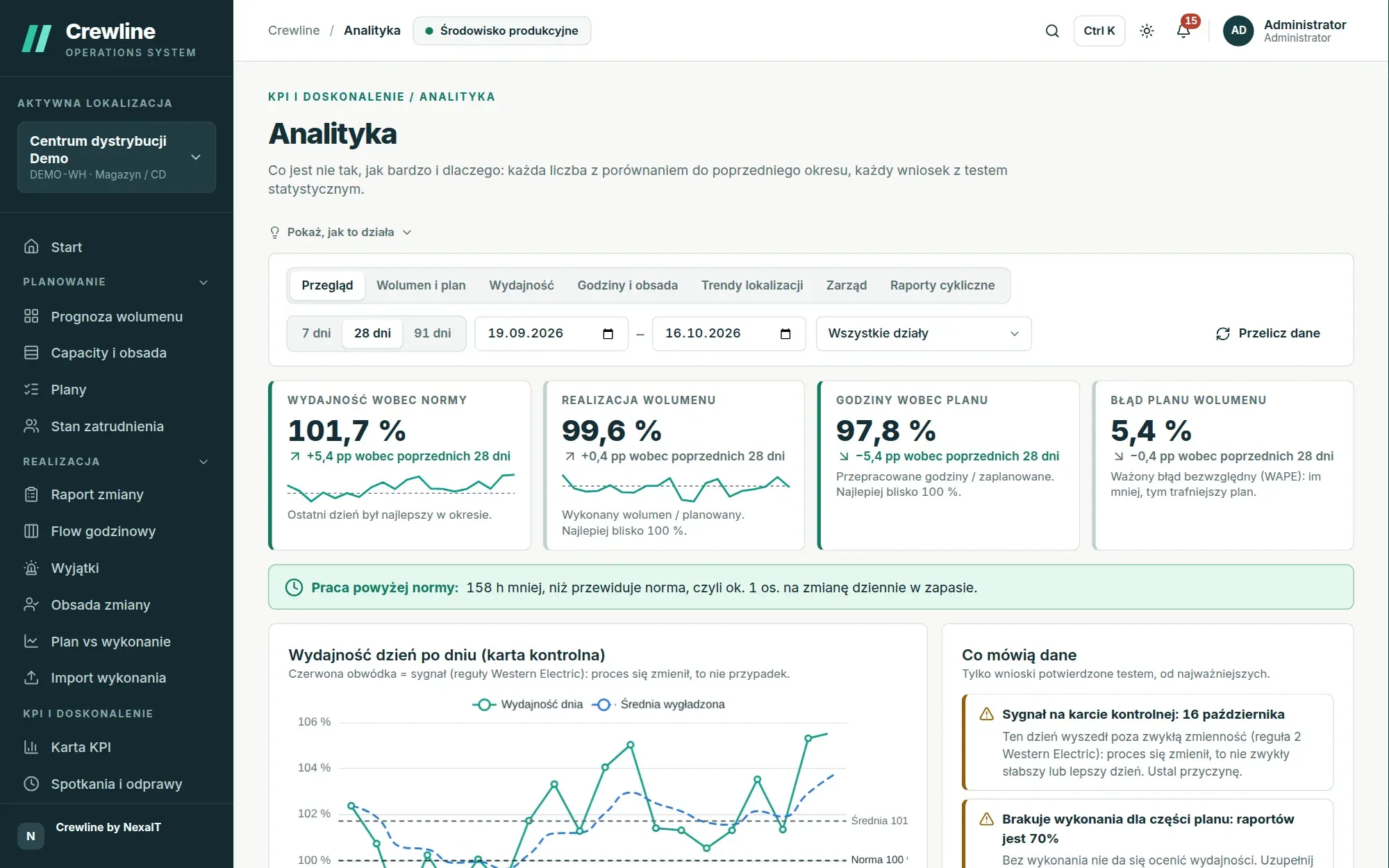
Overview: four figures and what they tell you.
The first view compares the selected period with the previous period of the same length. The four headline figures are productivity against standard (earned hours relative to hours worked), volume attainment, hours against plan and volume plan error, and each shows the change against the previous period, the daily trend and an annotation when the latest day was the strongest or weakest in the period.
Below the figures, the gap cost banner converts hours worked above standard into the number of people working a full shift every day, and the process table starts with the process losing the most hours. The period always ends yesterday, because today’s unfinished day would distort the comparison.
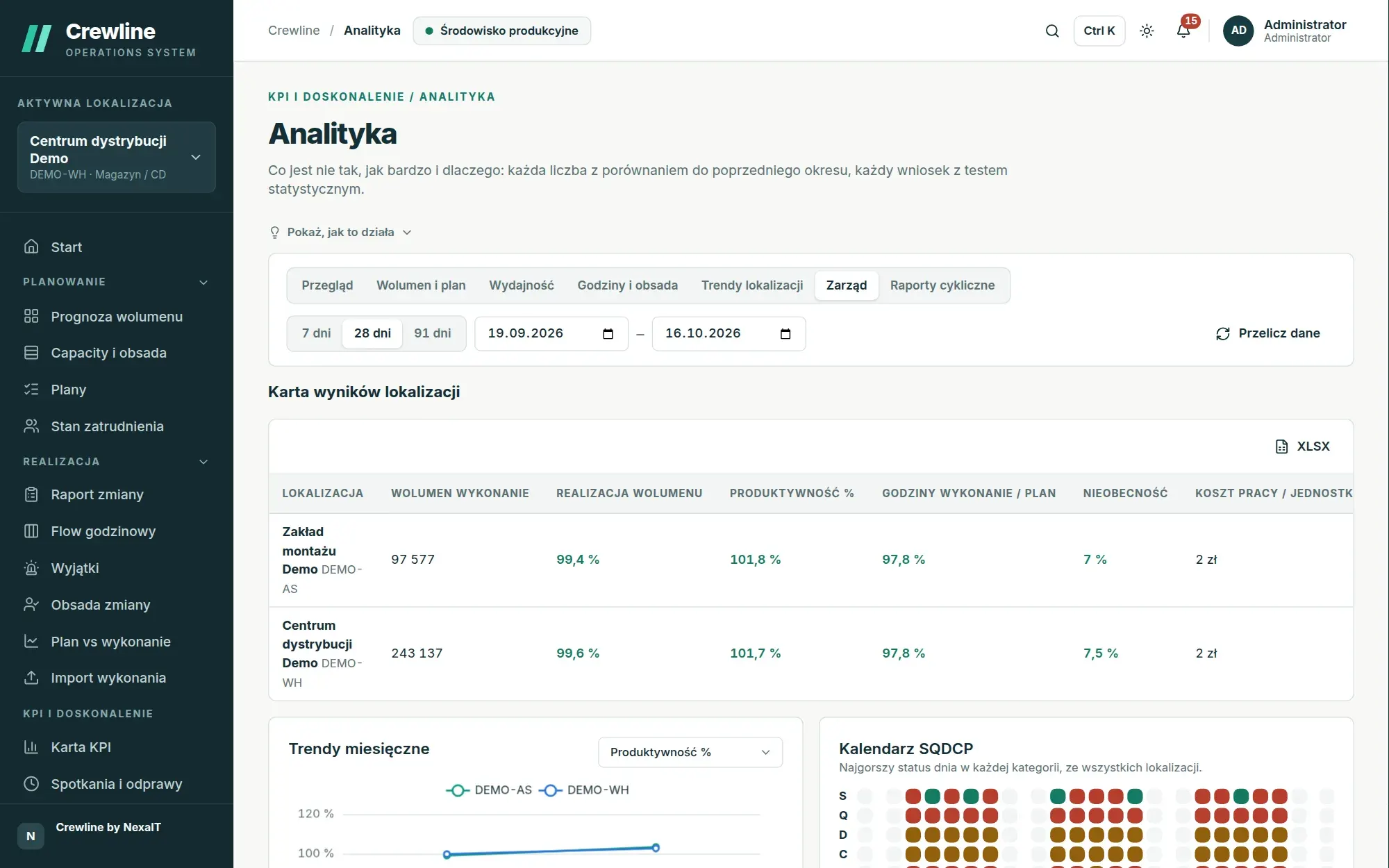
- a period of 7, 28 or 91 days, or any date range
- department filter and on-demand data recalculation
- XLSX export of every table
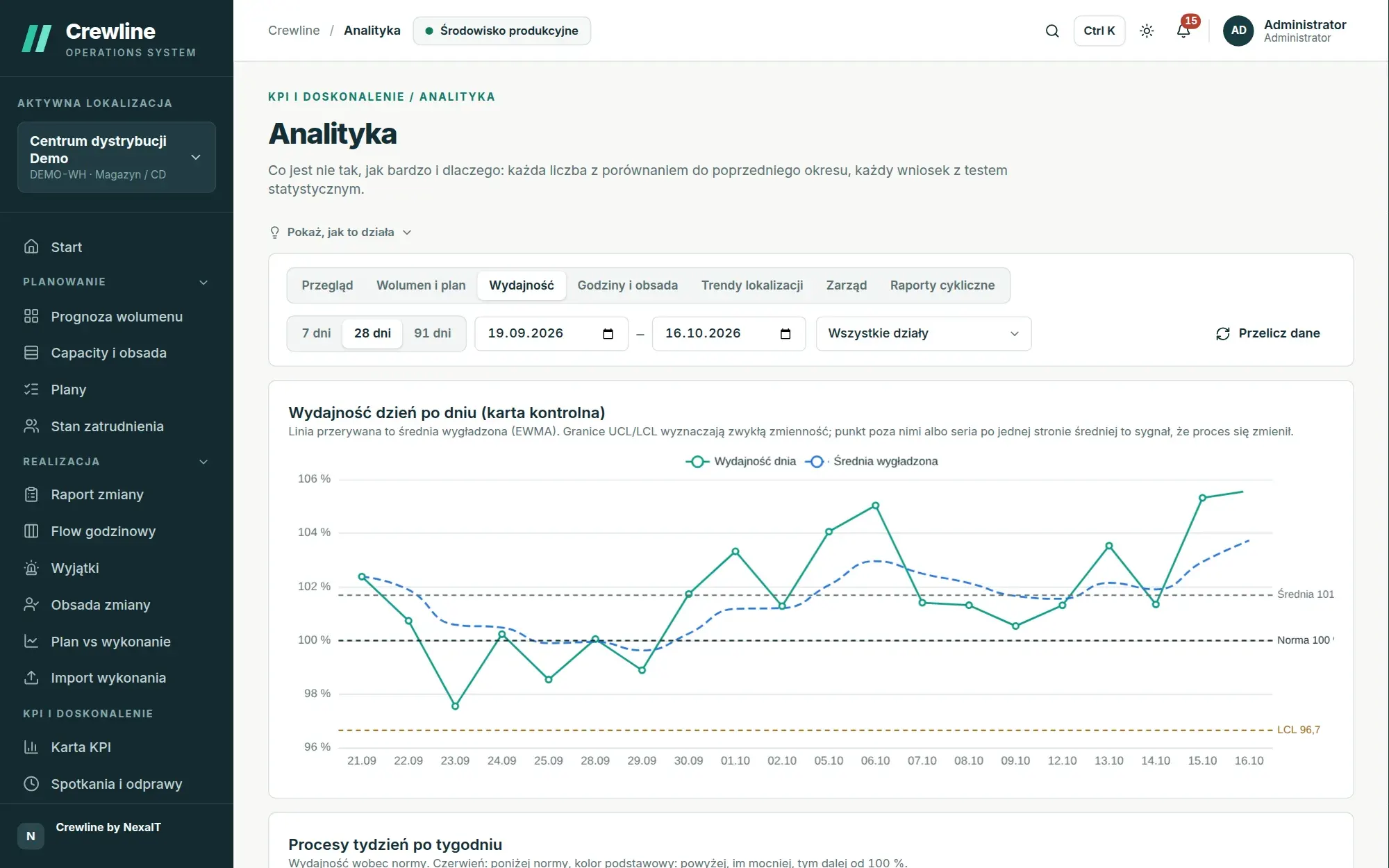
The control chart separates signal from noise.
Daily productivity is plotted on a control chart with the mean, the limits of normal variation, a smoothed average and a standard of 100%. When a day or a run of days breaks one of the Western Electric rules, the point is circled in red and the “What the data says” list explains that the process has changed, rather than it simply being a weaker day.
As a result, managers stop reacting to every dip that falls within natural variation and focus on the changes that genuinely have a cause. It is the same method that process improvement teams have used for decades, only applied automatically every morning.
Findings in plain words, confirmed by a test.
The “What the data says” list ranks findings by importance and describes them in sentences you can repeat at the huddle: picking slowed from 95 to 86%, productivity is falling by 1.2 percentage points a week, more is coming in than you plan for, Friday is clearly weaker than Tuesday, and three of seven processes account for 80% of the hours above standard.
Behind every sentence is a specific method: Welch’s t-test compares the first and second halves of the period, the Mann-Kendall test with the Theil-Sen slope confirms a trend, and the decomposition of the productivity change shows how much comes from the pace of work and how much from work shifting between processes with different standards. If the test confirms nothing, Crewline writes “no significant change” and does not invent an interpretation.
- Welch’s t-test and a test of proportions
- Mann-Kendall trend and Theil-Sen slope
- decomposition of the productivity change into a pace effect and a process mix effect
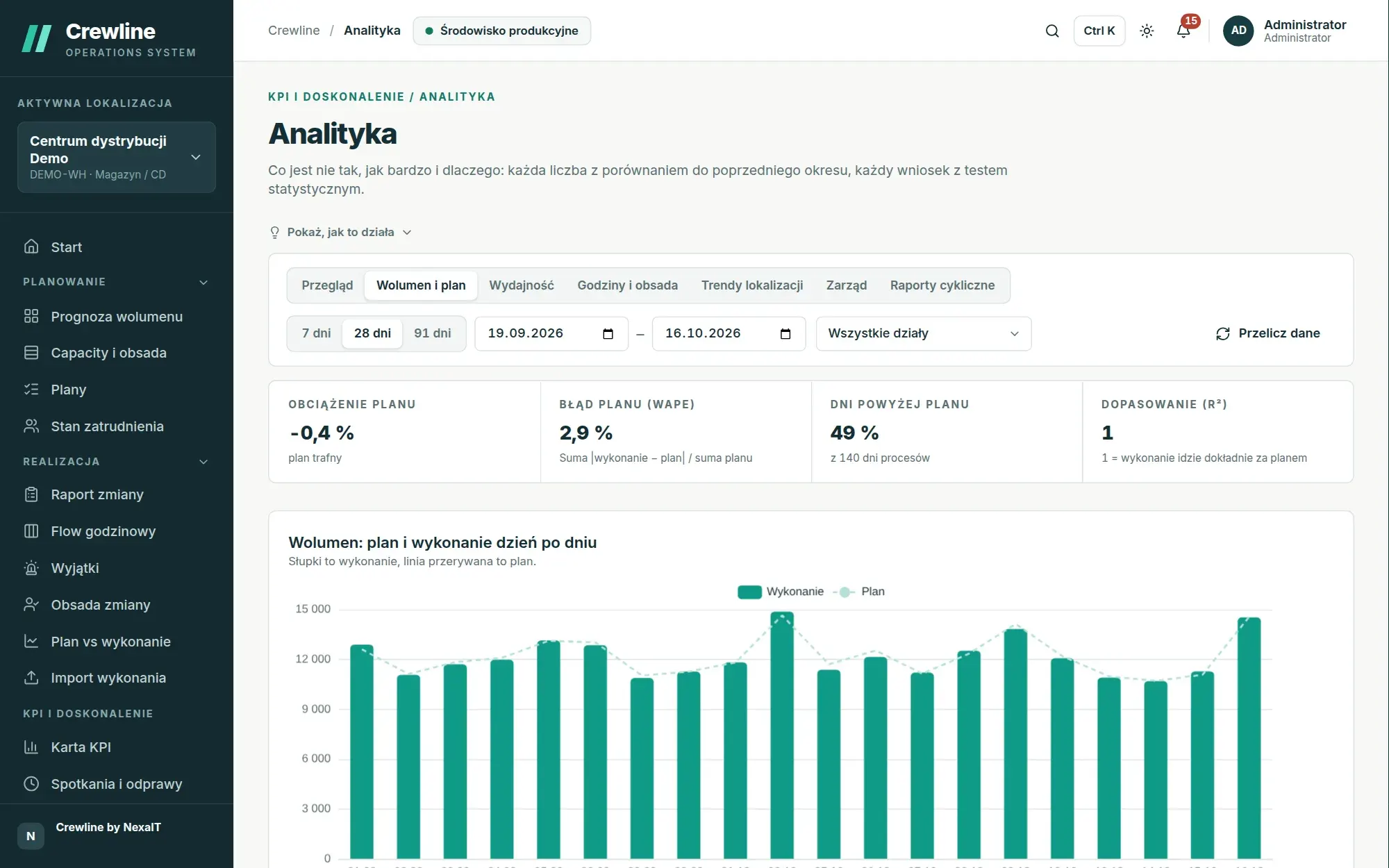
Volume and plan: whether the forecast is systematically off.
The volume and plan view checks the accuracy of the forecast on which the entire staffing plan depends. Bias, meaning the systematic error, shows whether the plan consistently overstates or understates volume, WAPE shows how far off it is on average, and the share of days above plan and the r² fit complete the picture.
A day-by-day chart of plan and actual, a scatter plot with the “plan equals actual” diagonal and an error distribution show whether the problem lies in a few unusual days or across the whole period, and the process table shows where the forecast needs correcting first.
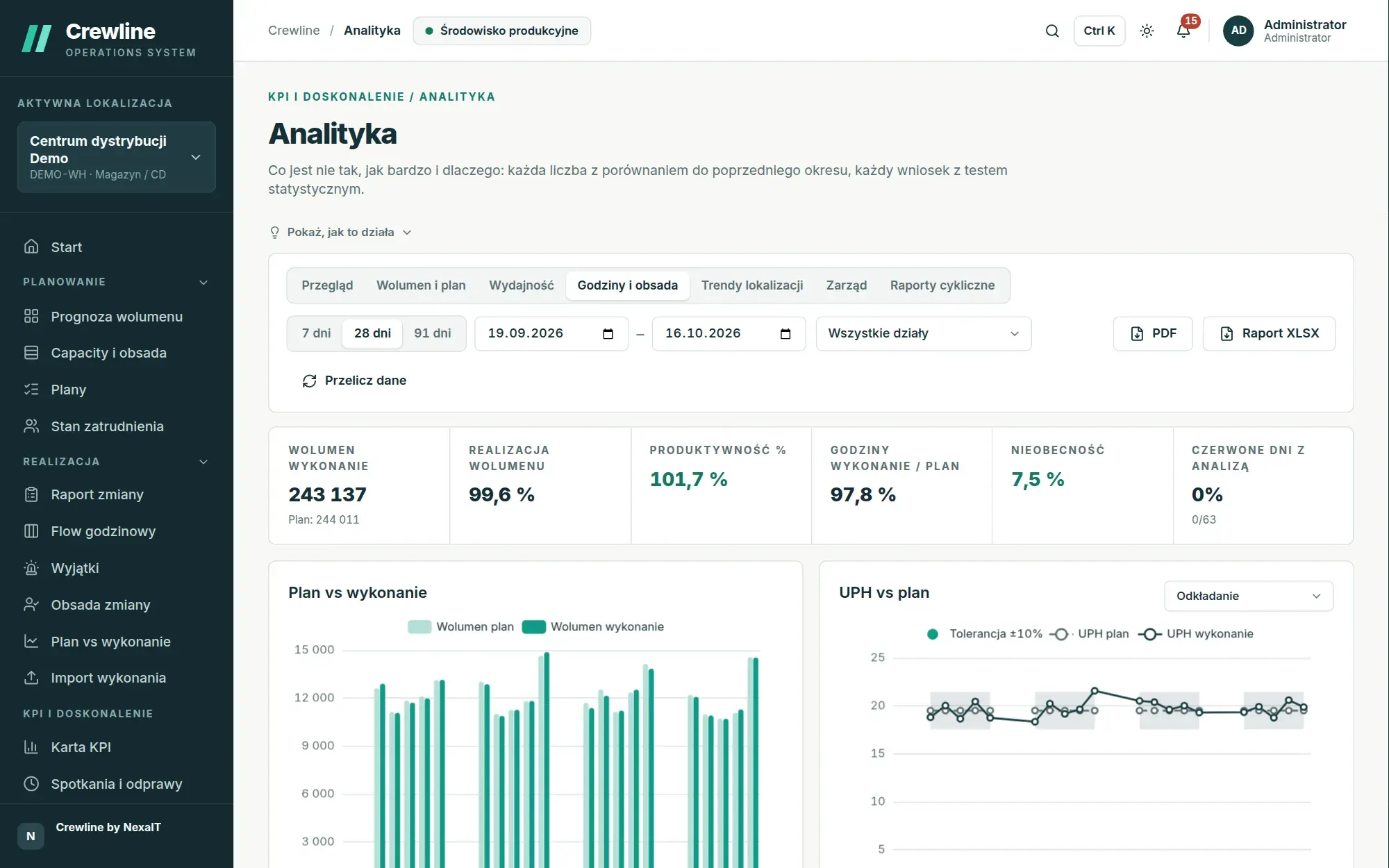
Hours, staffing and site trends.
The hours and staffing view brings together volume, attainment, productivity, hours against plan and absence, and the charts show plan vs actual, UPH against plan with a tolerance band, the staffing gap by day and shift, the distribution of hour variances, and the most frequently red indicators and absence categories in Pareto form.
Site trends aggregate data daily, weekly or monthly and add labour cost per unit, the number of meetings held and actions closed on time. A PDF or XLSX report from these views can also be sent automatically by email: daily, weekly or monthly at a time of your choosing.
Executive view: every site on one screen.
The management board and the operations director see a scorecard of all sites side by side, monthly trends with a choice of measure, the SQDCP calendar and a list of the week’s risks, each marked with a code, such as high absence, staffing shortfall, falling productivity or a gap in the plan. The KPI tree for a selected site lets you drill down from the result to the process.
Access to this view requires a separate permission, and it needs no personal data, because all analytics works on data aggregated to process, department and shift.
Questions about Crewline: analytics.
How does Crewline analytics differ from a BI tool dashboard?
A BI dashboard shows numbers and leaves the interpretation to the viewer. Crewline compares the period with the previous one, separates signal from ordinary variation using a control chart and statistical tests, and states a conclusion in words only when a test confirms it. Nor does it require you to build a data model, because it already knows the plan, standards and actuals from its own work cycle.
Does the analytics assess the performance of individual employees?
No, analytics works on data aggregated to process, department, day and shift. Crewline does not rank people, and its calculations are deterministic and explainable, with no machine learning assessing individuals.
What is gap cost?
It is the hours worked above what the standard allows for the volume completed, also converted into the number of people working a full shift every day. When work runs faster than standard, the same banner shows the surplus.
Can reports be delivered by email?
Yes, scheduled reports for a site or department are sent daily, weekly or monthly at a chosen time, in PDF or XLSX. They always cover the most recent completed period and require a configured mail server.
How quickly does data reach analytics?
Dashboards refresh automatically, usually within a minute of saving, and the KPI sheet and shift report show changes immediately. A user with the appropriate permission can also recalculate a selected period instantly.
Online demo · no obligation
See Crewline live, using your own processes as the example.
- Online demoWe walk through the full cycle on demo data from a distribution centre and an assembly plant, then ask about your processes, your shifts and the spreadsheets you plan in today.
- QuoteWe quote the licence, deployment and optional support for your company in a single offer, prepared after a conversation about scope.
- Installation and configurationA server on your network or one you rent in the cloud, an industry template, processes, process flows, standards and data migrated from your spreadsheets.
- Go-live with your teamThe first plan, the first huddle and training for planners, shift leaders and managers on the screens they will be using.