

NCrewline 2.3 · operations system by NexaIT
Shift execution visible hour by hour.
An approved plan tells you how much work and how many people you anticipated. Crewline helps you turn it into a specific shift: assign the crew present to processes, track the result every hour, name the cause of any variance and close the shift with a report the next shift leader can read in a minute.
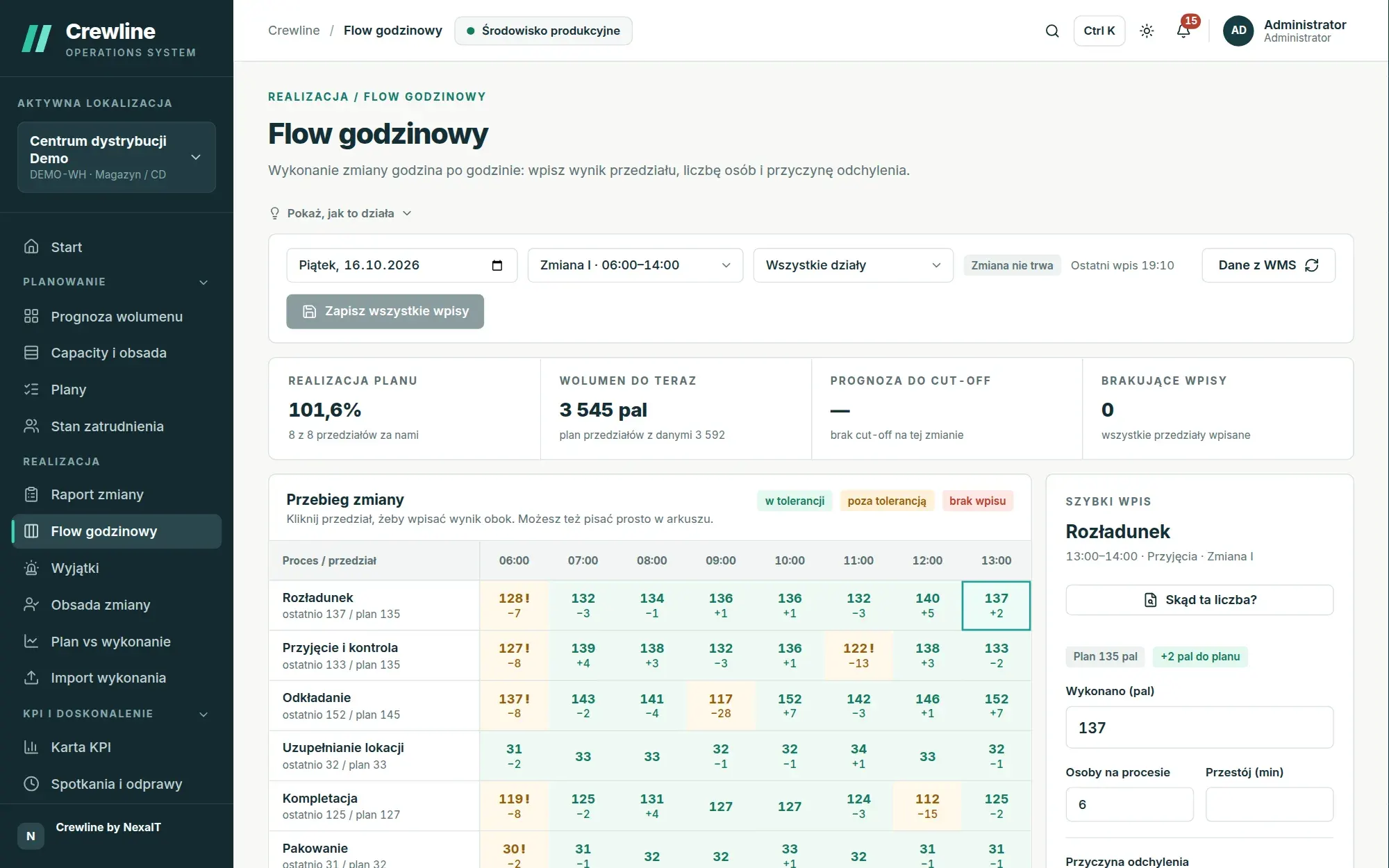
Shift staffing: optimal allocation in a few seconds.
The shift leader selects the day and shift, marks who is present and assigns people to processes by dragging cards or choosing a process from a list, on a tablet and from the keyboard as well. Each process header shows the number of people assigned against the requirement from the approved plan, and says so in words, for example “2 short” or “fully staffed”.
The suggest-allocation button runs the optimiser, which staffs the whole shift at once, taking into account qualifications and their levels, minimum and maximum process staffing, shared resources such as forklifts, and each person’s home department. The proposal states how many people were assigned, how many remain free and what was missing, for example two people qualified on the scanner, and nothing is saved until the shift leader applies it.
- two methods: optimal for the whole shift, and quick, which starts with rare qualifications
- job rotation option for optimal allocation
- a “missing qualification” badge when a person’s certificate has expired
- attendance can also be loaded from a file exported from the access control system
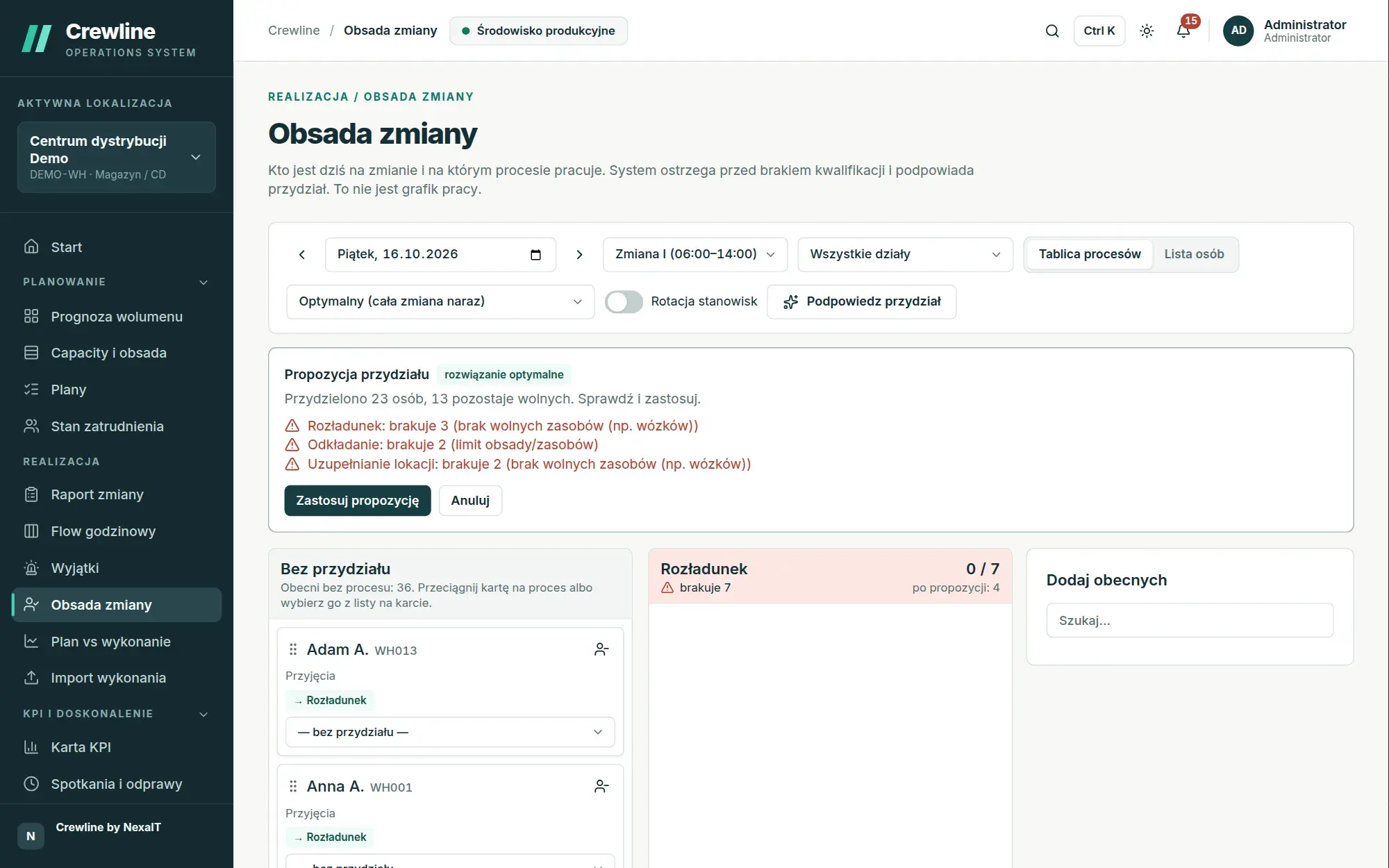
Hourly Flow: a variance shows up in the hour it occurred.
Flow divides the shift into slots, hourly by default, and if needed every 30 or 15 minutes or by checkpoints, such as carrier departure times. The slot plan comes from the volume in the approved plan and can allow for a slower start-up in the first hour, so it does not have to be a simple split of the shift into equal parts.
Each cell shows the result and the difference against the slot plan. A green cell is within the process tolerance, a yellow one is outside it, an exclamation mark means no cause has been given, and a red “no entry” label appears when a slot ended more than fifteen minutes ago and nobody has entered anything. Below the sheet, Crewline forecasts the result at the end of the shift and warns when a cut-off or the shift plan is at risk.
- quick entry for the shift leader: result, headcount on the process and downtime in minutes
- eight cause categories: material, equipment, method, staffing, quality, plan change, upstream process, other
- hourly data from the WMS or MES fills in the slots automatically, and the shift leader adds the causes
- a TV board showing the current shift’s Flow to the whole shop floor
Shift report with a handover for the next shift leader.
The shift report takes you through four steps: attendance, actuals, handover and review before submission. The shift leader enters own and agency staff present, absence by category, hours received from and released to other departments, and for each process the hours worked, actuals and, optionally, incoming work and backlog at the end of the shift, so the next plan knows the backlog even when the WMS does not send it.
A validation panel checks the report as you go using the same rules as the server, and a report whose hours do not reconcile with attendance cannot be submitted. The note for the next shift and flags such as an equipment problem, understaffing or escalation go to the next shift leader, and when a report carries an escalation flag, the system immediately notifies those who run the department’s huddles.
- an hours balance with 5% tolerance that blocks an inconsistent report
- correction of a submitted report with a reason, each one as a new revision
- saving without a network queues on the tablet and sends automatically
Plan vs actual broken down by cause.
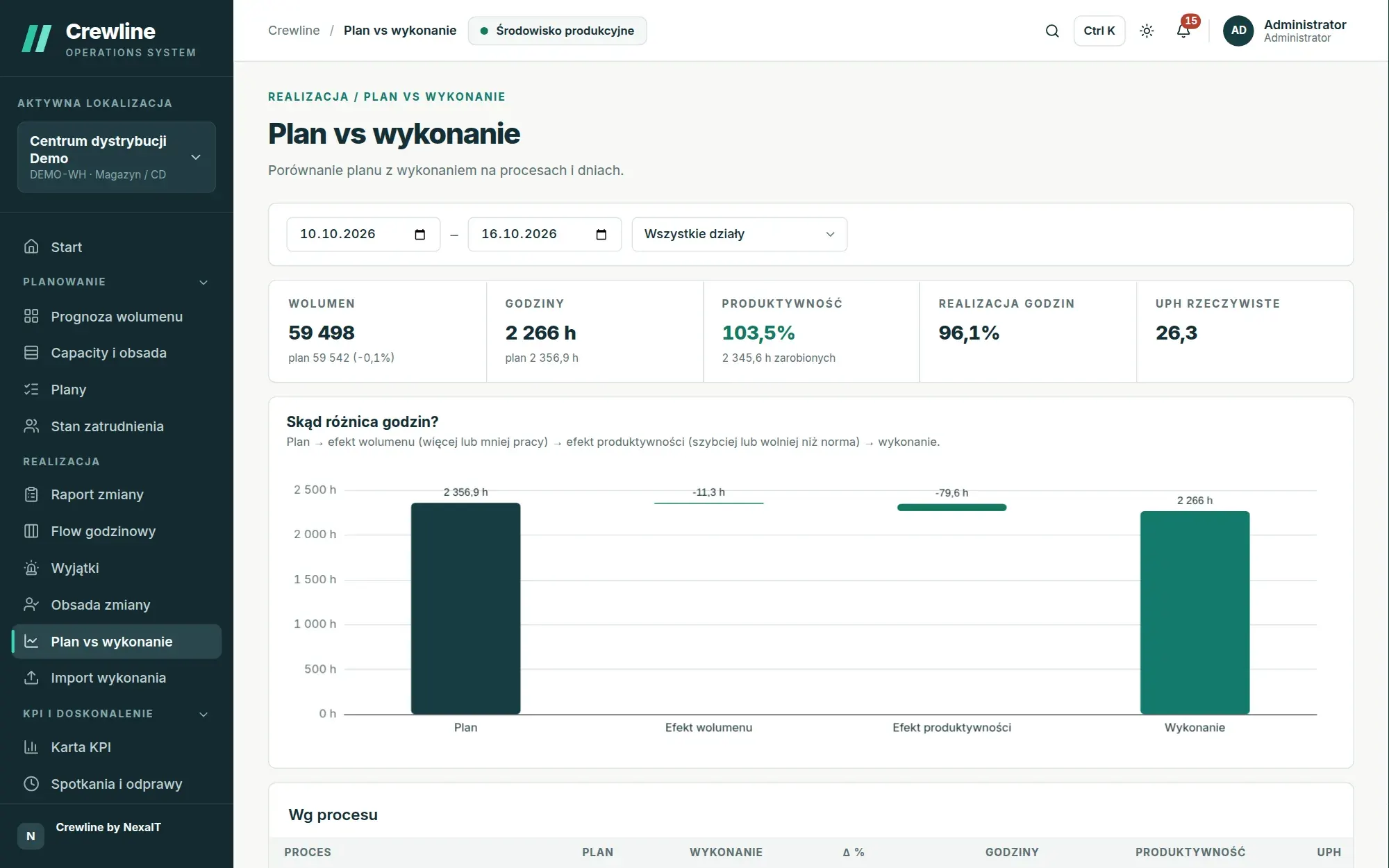
The plan vs actual screen sets out volume, hours, productivity, hours attainment and actual UPH for the selected period and department. The hours variance chart runs from the plan through the volume effect, meaning more or less work than assumed, and the productivity effect, meaning faster or slower work against the standard, to the actuals, so you can see at once whether the problem was volume or pace.
The table by process and by day also shows staffing accuracy, meaning staff present against plan. When the same actuals arrive from several sources, only one value counts, in a fixed order of priority: first the WMS or MES integration, then a file import, a submitted shift report, Flow and finally manual entry.
Where does this figure come from? The origin of every value.
For each process in the shift report and in Flow, you can open a panel showing what each source reports and which result counts, along with the full change history: who, when, from which system, the previous and the new value. The screen bars also show whether data from the systems is up to date, and when the WMS stops sending data, the end-of-shift forecast is marked as uncertain.
When a system gets it wrong, for example when a scanner counted return pallets twice, a person with correction rights fixes the value, giving the reason and the number of days it applies for. The correction takes precedence over all sources until the end of that period, after which the system value counts again, and everything remains in the history and the change log.
Exceptions inbox and response options, once the administrator enables them.
The exceptions inbox is a feature the administrator enables in the settings. It gathers problems that need an immediate response, most urgent first: a process will not make the cut-off or the end of the shift at the current pace, today’s or tomorrow’s plan is short of people, or a system has stopped sending data. Each card states how confident the assessment is, how much time there is to respond and what the suggested next step is.
When the shift plan is at risk, the response options lay out side by side the transfer of qualified people from processes running ahead of plan, overtime, additional agency staff with their travel time taken into account, and leaving staffing unchanged. Each option shows how much it will deliver, what shortfall will remain, the additional cost and its assumptions, and the decision is always made by a person.
- “I’ll take it”, “Postpone”, “Close” and “Create action” decisions recorded in the log
- an exception closes itself when two consecutive checks find no problem
Questions about Crewline: shift execution.
Does the shift leader have to enter the result manually every hour?
No, if your WMS or MES sends hourly actuals via the API, the Flow slots fill in automatically and the shift leader only adds the headcount and the causes of variances. Without an integration, entering one slot takes a few seconds in the quick-entry panel.
How does the suggested allocation of people to processes work?
The optimiser staffs the whole shift at once, taking into account qualifications and their levels, staffing limits, shared resources and each person’s home department. Manually set assignments are left untouched, and the proposal is not saved until the shift leader applies it.
What happens when there is no network on the shop floor?
Crewline installs on a tablet like an app. Without a network, saved KPI values, Flow entries and shift reports are queued on the device and sent automatically once the connection returns. Shift staffing requires a connection to the server.
Does the shift report include the names of absent staff?
No, the shift report contains figures only: own and agency staff present, absence by category and hours transferred between departments. Crewline does not collect the reasons for individual people’s absence.
Can a submitted report be corrected?
Yes, the author can correct their report within the correction window, by default 24 hours from submission, and the department manager and site manager can do so at any time. Every correction requires a reason and creates a new revision of the report.
Online demo · no obligation
See Crewline live, using your own processes as the example.
- Online demoWe walk through the full cycle on demo data from a distribution centre and an assembly plant, then ask about your processes, your shifts and the spreadsheets you plan in today.
- QuoteWe quote the licence, deployment and optional support for your company in a single offer, prepared after a conversation about scope.
- Installation and configurationA server on your network or one you rent in the cloud, an industry template, processes, process flows, standards and data migrated from your spreadsheets.
- Go-live with your teamThe first plan, the first huddle and training for planners, shift leaders and managers on the screens they will be using.